How to Set Up and Optimize Translation Memory for Maximum ROI
Key Takeaways
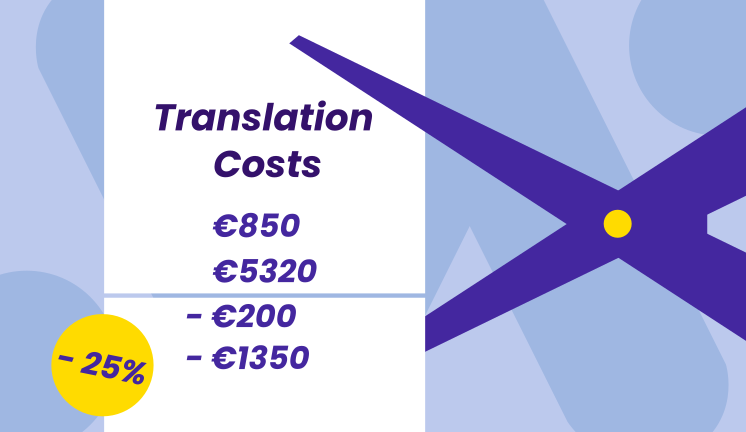
- A well-structured translation memory can cut translation costs by 20–40% on repetitive content and accelerate time-to-market across releases.
- ROI depends on correct initial setup (segmentation, language pairs, TMX imports) and ongoing maintenance (cleaning, deduplication, governance).
- Aligning your TM strategy with content types (UI strings, help center, legal, marketing) and locales (en-US vs en-GB) from day one prevents costly rework.
- Combining TM with machine translation and QA workflows yields the highest payoff, with most teams seeing measurable returns within 6–12 months.
- Governance matters: separating master TMs from project TMs and enforcing review workflows protects quality and long-term value.
Introduction: Why Translation Memory Setup Matters for ROI
Translation memory is more than a checkbox feature in your CAT tool—it’s an important linguistic asset that accumulates value over years when set up correctly from the start. Think of it as a database that stores all the translations your team has ever produced, ready to suggest previous translations whenever similar or identical content appears again.
Consider a SaaS company localizing its product and documentation into 10 languages between 2024–2026. In their first release, they translate 50,000 words per language from scratch. By the third release, with a mature translation memory database in place, 60% of their content matches existing translations. That’s 30,000 words per language that translators can validate and edit rather than recreate—shaving days off each release cycle and cutting costs by tens of thousands of dollars annually.
This article focuses specifically on how to set up and optimize translation memory for measurable ROI in time, budget, and overall quality. We’ll cover planning, technical setup, governance, and optimization steps that project managers and localization teams can implement immediately.
Translation Memory Basics: Foundations Before You Set Up
A translation memory is a database of aligned source–target text segments (typically sentences or phrases) that can be reused across future translations. Every time content is translated, those segments are stored. When similar source text reappears, the TM suggests prior translations, allowing translators to validate matches rather than starting from scratch.
How TM Differs from Other Linguistic Assets
Understanding what translation memory is—and isn’t—helps you set it up correctly:
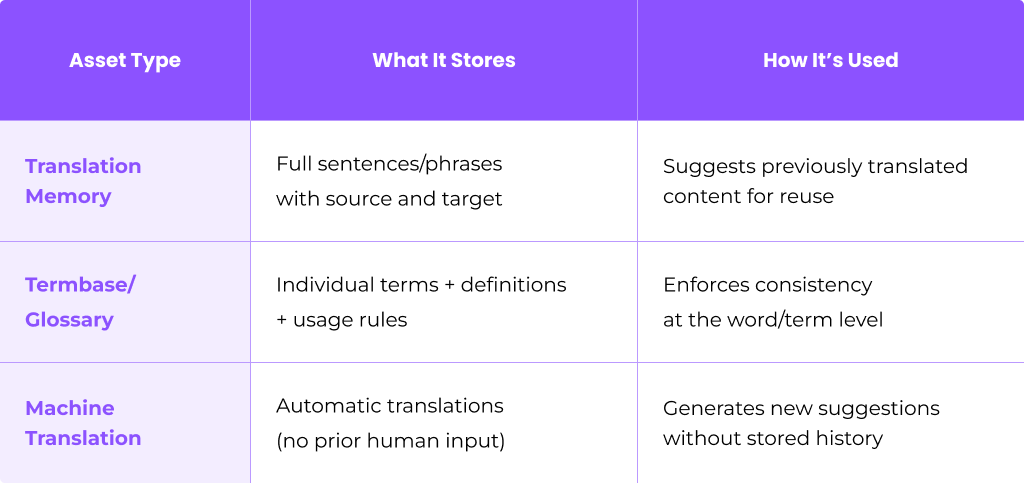
A mature localization project often uses all three together: the glossary to enforce terminology, TM for segment reuse, and MT as a fallback for new content.
Segment Types and Segmentation Rules
Segments can be full sentences, UI strings, headings, or even legal boilerplate. The segmentation rules you configure determine where to break content—by period, HTML tag, JSON key, or other markers. Inconsistent segmentation across documents and languages causes TM matches to degrade, so this decision matters.
Match Types and Why They Matter
Match types directly affect your cost savings and how much human input is needed:
- 100% Exact Matches: Source text identical to a stored segment
- Context Matches (ICE): 100% match including surrounding context or file location
- High Fuzzy (95–99%): Minor differences—typos, one word changed
- Medium Fuzzy (85–94%): More structural or lexical changes
- Low Fuzzy (75–84%): Significant differences requiring substantial editing
- No Match: Entirely new content
Most vendors apply tiered discounts based on match percentage. A 100% match might cost 10–20% of a new word, while a 75% fuzzy match costs 60–70%. Understanding these bands helps you estimate ROI accurately.
File Formats for TM Setup
When importing existing translations or exchanging TMs between tools, you’ll encounter:
- TMX (Translation Memory eXchange): The industry standard for moving TM data across platforms
- SRX (Segmentation Rules eXchange): Standard format for sharing segmentation rules
- CSV/XLSX: Common for legacy data or simple bilingual exports
- Proprietary formats: Tool-specific files from SDL Trados, memoQ, Wordfast, and others

Plan Your Translation Memory Strategy for Maximum ROI
Planning your TM structure before the first import avoids costly rework after your first year of localization. Teams that skip this step often end up with polluted TMs that mix domains, confuse locales, and deliver irrelevant suggestions.
Map Your Language Pairs
Start by documenting your core language pairs. For instance:
- en-US → de-DE
- en-US → fr-FR
- en-US → ja-JP
- en-US → es-MX
Be precise about locales. Treating “Spanish” as a single language when you serve both Mexico and Spain leads to mismatches and tone drift.
Decide on TM Structure
Choose whether to maintain separate translation memories or a unified approach:
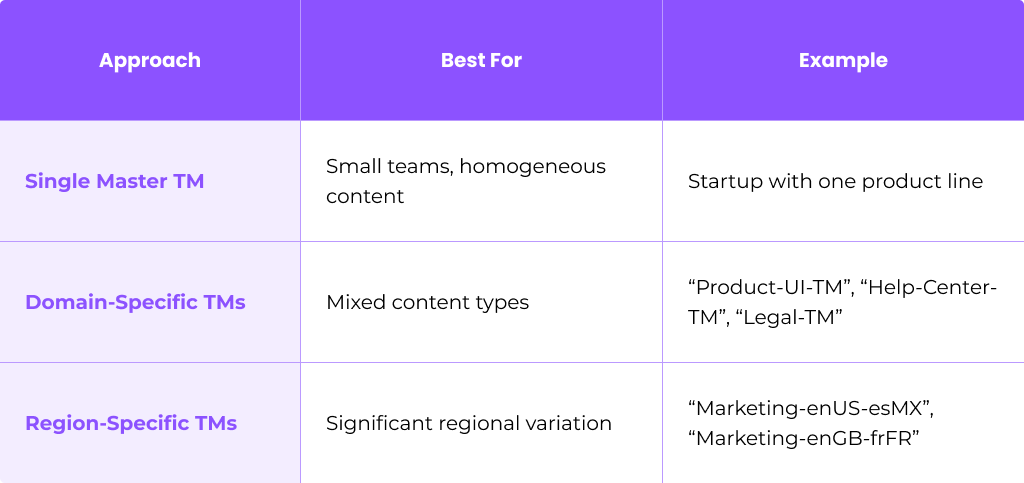
One case study from Argos Multilingual showed that splitting a large “main TM” into department-specific TMs decreased review time and improved translation quality.
Identify High-ROI Content Types
Focus initial TM investment on content with the highest repetition rates:
- Support articles and knowledge bases
- Product UI strings and in-app messages
- System notifications and emails
- Technical documentation
Marketing and creative content typically show lower TM leverage but still benefit from consistent terminology.
Estimate Potential Savings
Build a simple model: if your current release has 10,000 words and historical repetition analysis suggests 40% will match in future releases, you can project savings across your annual release calendar. Research shows that with proper TM maturity, enterprises see savings of 10–50% depending on content repetition.
Assign Ownership and Review Cadence
Decide who owns TM strategy—typically a localization manager or language lead. Schedule quarterly reviews to assess:
- Match rates and reuse trends
- Quality of suggestions
- Need for cleaning or restructuring
Step-by-Step: Initial Translation Memory Setup
This section walks through a practical, tool-agnostic setup sequence from a blank TM to a production-ready asset.
Step 1: Create the TM Container
Set up a new translation memory in your translation management system or CAT tool. Use clear naming conventions that capture:
- Product or domain
- Source and target language
- Version or date
Example: Core-Product-enUS-deDE-TM-v1-2024
This naming convention helps project managers quickly identify which TM to attach to each project.
Step 2: Define Languages and Locales
Select precise locales rather than generic language codes:
- Use en-US and en-GB separately, not just en
- Distinguish pt-BR from pt-PT
- Separate zh-Hans (Simplified Chinese) from zh-Hant (Traditional)
Locale selection influences fuzzy matches, SEO keywords for localized content, and cultural appropriateness of suggestions.
Step 3: Configure Segmentation Rules
Define how content breaks into segments:
- Sentence-based: Standard for documentation and articles
- Custom rules: For UI keys, short labels, or marketing headlines
- Tag-aware: For HTML, XML, or JSON files
For instance, when segmenting JSON files from a mobile app, you might configure the TM to treat each key-value pair as a segment rather than breaking on periods within values.
Consistent segmentation across all languages is critical. Without it, what looks like similar content gets missed as potential matches.
Step 4: Import Existing Translations
Bring in past translations to jumpstart your TM:
- Export TMX files from previous vendors or legacy tools (SDL Trados, memoQ, Wordfast)
- Map columns carefully when importing from CSV/XLSX (source, target, context, domain)
- Handle multiple target languages by importing each language pair separately or using a multi-language TMX
Quality-check imported segments—if source and target documents have drifted over time, some alignments may be incorrect.
Step 5: Align Bilingual Documents
If you have old source and target files (.docx, .idml, .html) that were never captured in a TM, use alignment tools to pair them into TM entries.
Process:
- Feed source file and corresponding translated content into alignment utility
- Review and correct any misaligned segments
- Export aligned pairs as TMX
- Import into your TM with appropriate metadata
Perform light QA on aligned output before trusting it in production—especially for documents from 2018–2023 that may have informal revision histories.
Step 6: Set TM Access and Permissions
Protect your translation memory quality with role-based access:
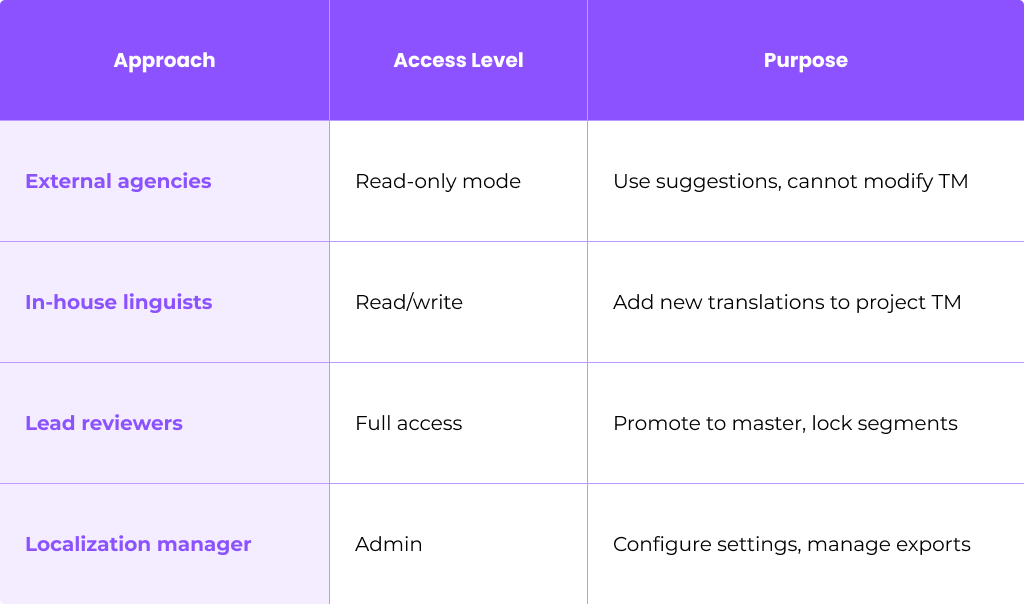
This governance structure prevents unreviewed or low-quality content from polluting your master TM.
Optimize Translation Memory Configuration for Quality and Speed
Fine-tuning match thresholds and priorities directly impacts translator throughput and cost savings.
Configure Match Thresholds
Set up fuzzy match bands that align with your workflow:
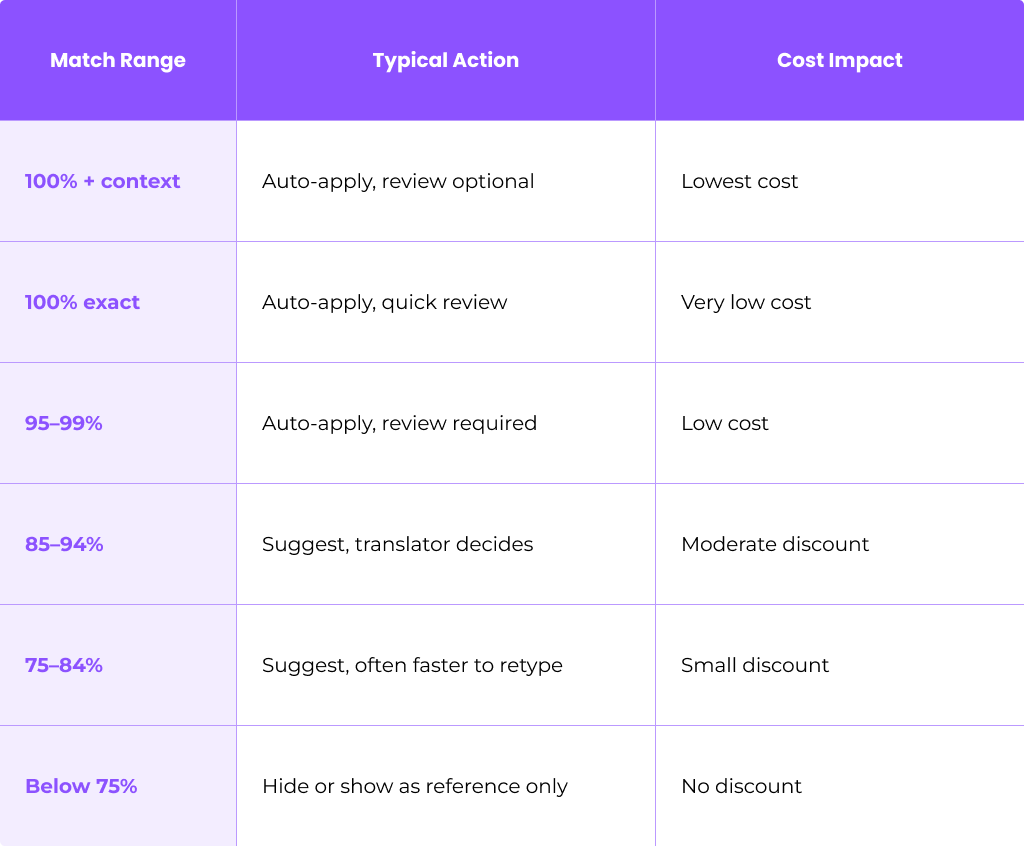
For pre-translation, most teams auto-apply from 95% and above, leaving lower fuzzy matches for translator judgment.
Set TM Priority and Penalties
When multiple TMs are attached to a project, rank them:
- Master TM (highest priority, most trusted)
- Product-specific TM
- Legacy Vendor TM (apply penalty so matches appear lower)
Penalties reduce confidence scores on suggestions from older or less-trusted sources, preventing misuse of stale translations.
Use Context and Metadata
Rich metadata improves match relevance:
- Domain: legal, marketing, UI
- Product area: checkout, onboarding, settings
- Platform: web, iOS, Android
- Version: 2025.1, 2025.2
For instance, the UI string “Save” may translate differently in a software context versus a financial services context. Context-based matching reduces these errors.
Configure Pre-Translation Rules
Enable automatic pre-translation from TM before human work begins. Common configurations:
- Apply all 100% and context matches automatically
- Apply 95–99% matches with review flags
- For segments with no match, route to machine translation
- Post-edit MT output to bring it up to human quality
This hybrid approach maximizes speed while maintaining quality.
Example Scenario
A mobile app releasing version 2.1 in 8 languages has 5,000 UI strings. Analysis shows 60% match previous version 2.0. With TM pre-translation:
- 3,000 strings auto-applied from TM (validation only)
- 2,000 strings routed to MT + post-editing
- Net-new translation effort reduced by 60%
- Estimated time savings: 1 day per language
Building a High-Quality Master TM: Governance and Workflows
The distinction between a master TM and project-level TMs is essential for maintaining quality over time.
Two-Layer Workflow
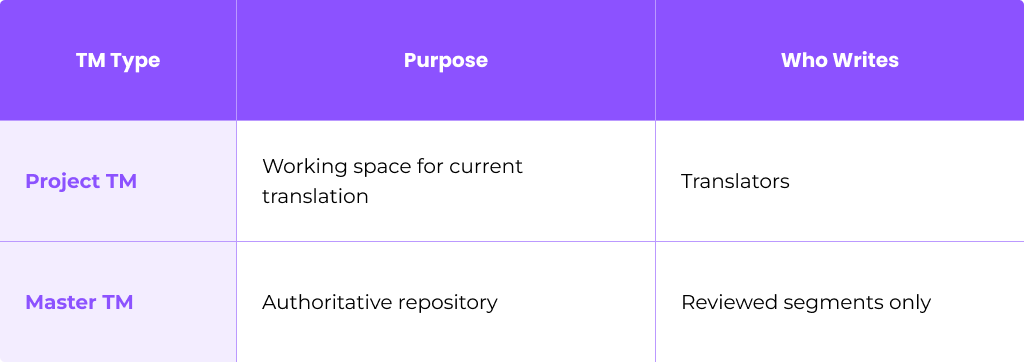
Translators write into project TMs during active work. Only reviewed and approved segments are promoted into the master TM—typically monthly or after each major release.
Review and Approval Process
In-country reviewers or senior linguists validate translations before they become canonical:
- Translator completes segment
- Reviewer validates for accuracy, style, and terminology
- Approved segments are flagged for master TM promotion
- Localization manager runs promotion workflow
This is crucial for regulated industries like fintech, healthcare, and legal, where errors carry compliance risks.
Lock Critical Segments
Lock 100% + context matches for content that should never change:
- Brand taglines and product names
- Compliance statements and legal boilerplate
- Core UI elements (menu items, button labels)
Locked segments protect brand integrity and ensure consistency across all translation projects.
Integrate Terminology
Termbases and style guides underpin TM quality. Before promoting segments to master:
- Run terminology checks against approved glossaries
- Flag any segments using deprecated or incorrect terms
- Correct issues before promotion
This prevents terminology drift from accumulating in your most trusted TM.
Ongoing Maintenance: Cleaning and Updating Your Translation Memory
Translation memories degrade over time without maintenance. Duplicates accumulate, terminology changes, and outdated content pollutes suggestions—all of which reduce ROI and increase review time.
Schedule Regular Cleaning
Establish a maintenance cadence:
- Semi-annual: Full TM audit and cleanup
- Per major release: Remove deprecated content
- Quarterly: Quick deduplication pass
Typical Cleaning Tasks
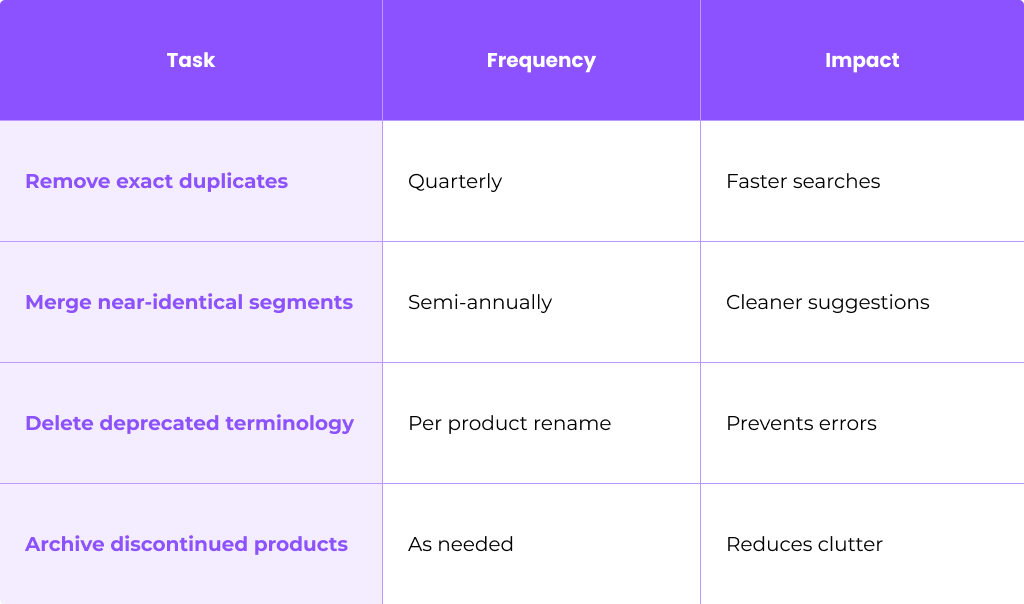
Use TM Cleaning Tools
Most translation memory software includes cleaning utilities:
- Export TM as TMX
- Run deduplication scripts or cleaning modules
- Review changes before applying
- Create dated backup (e.g., master_TM_2025-03-01.tmx)
- Reimport cleaned TMX
Always back up before cleaning. A dated backup file pattern like YYYY-MM-DD prevents confusion when you need to restore.
Correct Errors and Propagate Changes
When a key product term changes—for example, “Projects” renamed to “Spaces” in 2025—you need to update affected segments:
- Search TM for all instances of the old term using concordance search
- Update translations with the new terminology
- Validate updated segments with reviewers
- Re-promote to master TM
Metadata-driven search makes this far faster than manual file hunting.
Archive Legacy TMs
When products or domains are retired:
- Move their TM segments into archive TMs
- Set archive TMs to read only mode
- Document which TMs are active vs archived
Archived content won’t appear in active suggestions but remains available for reference if needed.
Maintain a Change Log
Keep a simple log for major TM modifications:
- Date
- Editor name
- Scope of change
- Reason
This auditability helps when troubleshooting issues or onboarding new team members.

Measuring ROI from Your Translation Memory
ROI should be tracked from the first quarter after TM setup and revisited at least annually.
Key Quantitative Metrics
Track these indicators across translation projects:
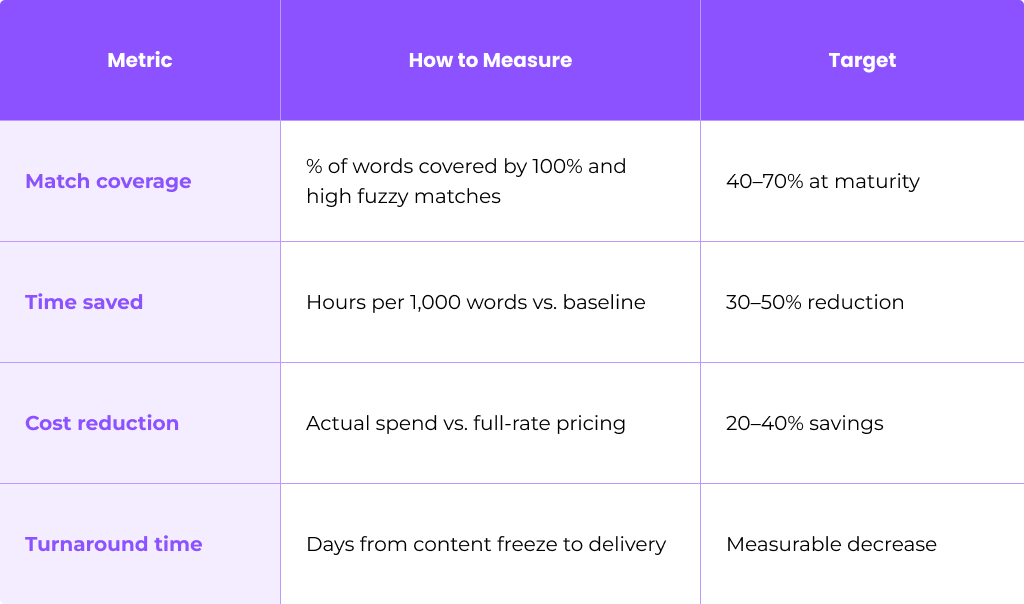
Research from Taia shows that a 10,000-word project with 40% TM matches saved about 30–40% on professional translation costs.
Establish Baseline Comparisons
Compare similar projects:
- 2024 project (minimal TM): 10,000 words, 5 languages, $15,000, 10 days
- 2025 project (mature TM): 10,000 words, 5 languages, $10,000, 6 days
Document these comparisons to demonstrate value to stakeholders.
Quality and Consistency Indicators
Beyond cost and time, track:
- Fewer terminology errors in QA reports
- Reduced back-and-forth with reviewers
- Higher stakeholder satisfaction scores
- More consistent translated content across languages
Report ROI Internally
Present TM value to product and finance teams with concrete data:
- Quarterly savings reports
- Visual dashboards showing match rates over time
- Projections for additional language coverage
- Justification for investments in better TMS, MT, or linguist training
Advanced Practices: Combining TM with Machine Translation and Automation
Pairing TM with MT and automation workflows unlocks additional ROI, especially for continuous localization pipelines with frequent releases.
TM + MT Hybrid Workflows
A typical hybrid workflow:
- TM lookup first: Apply all high-confidence TM matches
- MT fallback: Generate suggestions for no-match or low-fuzzy segments
- Post-editing: Human linguists refine MT output to match quality standards
- TM capture: Store reviewed segments for future translations
This approach works particularly well for lower-risk content like internal documentation and support FAQs.
Pre-Translation and Auto-Substitution
Maximize automation before translators start:
- Pre translate all TM matches above your threshold
- Auto-substitute placeholders, tags, numbers, and dates
- Apply MT to remaining segments
- Flag segments requiring human review
Auto-substitution alone can reduce manual edits by 10–15% on technical content.
Automation Triggers
Connect your localization project to development workflows:
- Git integration: When a pull request is created, new strings are sent to TMS
- CI/CD pipelines: Automated pre-translation from TM/MT
- Webhook triggers: Route linguists only net-new segments
Example: Weekly Release Automation
A software company with weekly UI updates implemented automation in 2025:
- Source merge triggers TM/MT pre-translation
- Only net-new segments (typically 10–15% of strings) route to translators
- Review workload shrank by 50%
- Turnaround improved by 30–40%—enabling faster turnaround without adding headcount

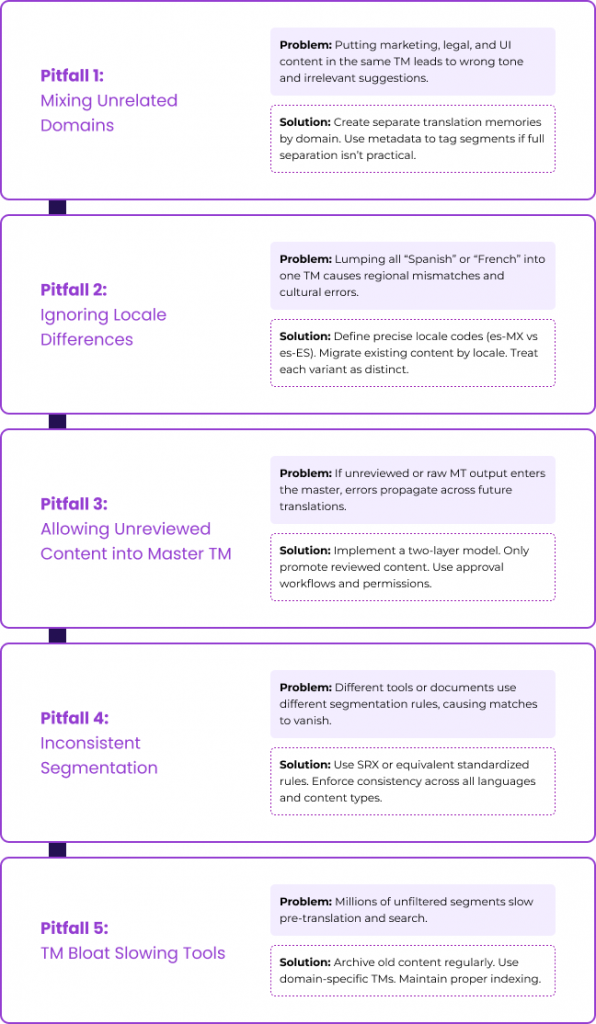
Common Pitfalls in Translation Memory Setup (and How to Avoid Them)
Many teams lose TM value due to a few avoidable setup mistakes. Here’s what to watch for and how to fix it.
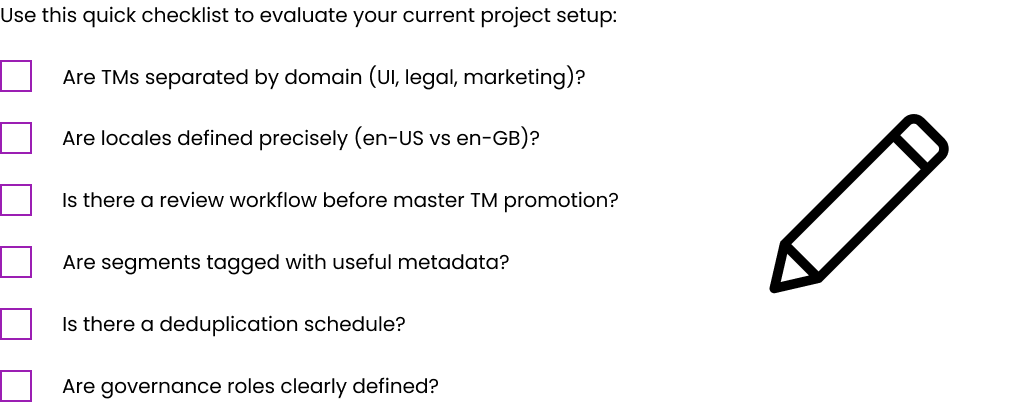
Self-Audit Checklist
FAQ
How long does it take to see ROI from a new translation memory setup?
Most teams see noticeable savings after 2–3 medium-sized projects or within 3–6 months of continuous releases. ROI appears faster for high-volume, repetitive content like support portals and product UI, where match rates can reach 40–70%. Creative or one-off campaigns show slower returns due to lower repetition.
Track match rates and cost-per-word over at least two release cycles before drawing firm conclusions. Initial investments in setup and cleaning pay off as your TM matures and your various types of content accumulate.
Should I create one global TM or multiple TMs for different products and regions?
Most organizations benefit from a hybrid approach: a central “core” TM for shared product language plus domain- or region-specific TMs. For instance, you might have a master UI TM that all products share, plus separate “Legal-enUS-esMX” and “Marketing-enGB-frFR” TMs.
Separating by domain helps preserve correct tone and register (formal vs informal) while still allowing reuse of common system messages. The decision should reflect your content volume, regulatory requirements, and how different your regional messaging is.
Can I repair a badly set up or polluted translation memory, or should I start over?
Repair is usually possible through cleaning, filtering by metadata, and promoting only reviewed segments into a new master TM. Export your existing project TM, run cleaning scripts to remove duplicates and low-quality segments, then iteratively validate before deploying a refreshed version.
A full restart makes sense when you have heavily mixed languages, pervasive MT errors with no metadata flags, or content so disorganized that cleaning would take longer than rebuilding. Always take a backup before any major cleanup operation.
How big can a translation memory get before it slows translators or tools down?
Modern cloud-based TMS platforms typically handle millions of segments without noticeable slowdown, as long as indexing and search are optimized. Research indicates some organizations achieve ~76% infrastructure cost savings by moving to cloud TM storage.
Performance issues usually arise from poor organization—too many mixed domains in one TM—rather than sheer size. Use filters, domain-specific TM databases, and proper indexing. Contact your localization platform provider if search becomes slow approaching multi-million segment scale.
Do I still need human translators if I have a strong TM and machine translation?
Human linguists remain essential to ensure accuracy, style, and cultural fit—particularly for branded content and UX-critical interfaces. TM and MT shift their role toward reviewing, editing, and ensuring consistency rather than typing every sentence from scratch.
The highest ROI comes from combining TM, MT, and skilled linguists in a well-designed workflow. Research shows translators’ effective throughput can double or more with high TM leverage, but human expertise is what transforms suggestions into polished, culturally appropriate content. Think of TM and MT as tools that boost productivity, not replacements for human judgment.
Table of Contents
- Introduction: Why Translation Memory Setup Matters for ROI
- Translation Memory Basics: Foundations Before You Set Up
- Plan Your Translation Memory Strategy for Maximum ROI
- Step-by-Step: Initial Translation Memory Setup
- Optimize Translation Memory Configuration for Quality and Speed
- Building a High-Quality Master TM: Governance and Workflows
- Ongoing Maintenance: Cleaning and Updating Your Translation Memory
- Measuring ROI from Your Translation Memory
- Advanced Practices: Combining TM with Machine Translation and Automation
- Common Pitfalls in Translation Memory Setup (and How to Avoid Them)
- FAQ
Ready to manage your Translation company easily?
Get Started for Free