Translation Agency Client Portal: Why Your Clients Expect One (And How to Set It Up)
Key Takeaways
- In 2026, enterprise buyers expect every serious translation agency to provide a secure, self-service client portal.
- A client portal centralizes translation projects, quotes, files, invoices, messages, and project history, so clients and LSP teams spend less time digging through email.
- Awtomated gives language service providers a branded portal without custom development, often making launch possible in days rather than months.
- The strongest portals give clients full visibility into status, cost, delivery timelines, terminology, documents, and approvals.
- This guide explains what to include, how to roll out your portal, and which KPIs to track after launch.
What Is a Translation Agency Client Portal (And Why It Matters in 2026)?
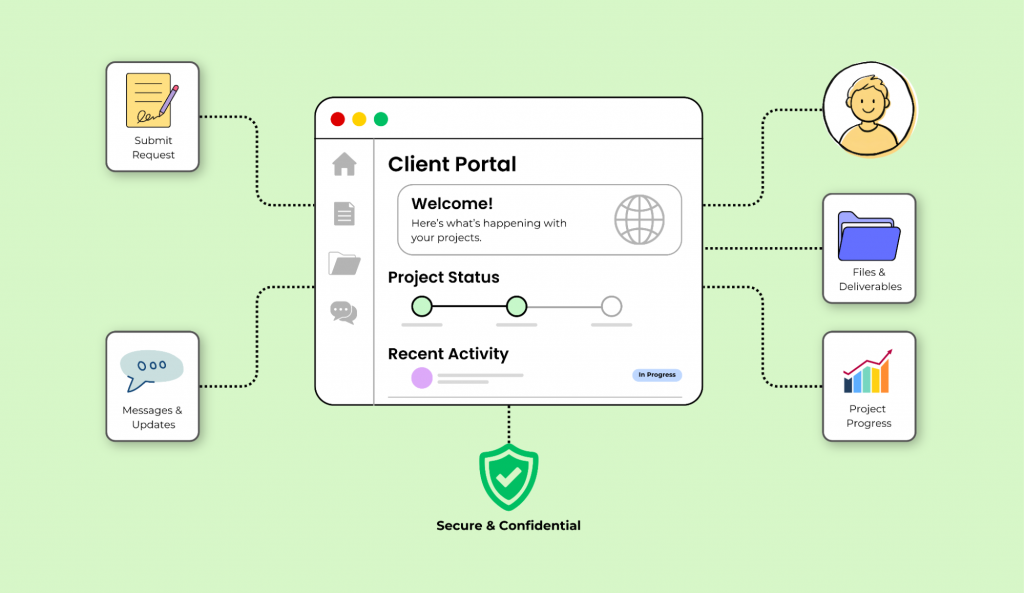
A translation agency client portal is the secure online place where your clients can submit requests, upload documents, review quotes, track translation projects, download deliveries, manage invoices, and find project history. Put simply: a client portal is a secure web-based platform for managing translation projects.
Client portals centralize translation project management in one location. Instead of scattered email threads, spreadsheets, shared drives, and “which version is final?” confusion, the portal becomes the single system where all information lives. Client portals provide secure access to project history and documents, and Project history and related documents are accessible under one account.
This matters because modern localization buyers no longer compare your agency experience only to other LSPs. They compare it to Jira, HubSpot, procurement portals, HR systems, IT service desks, and every other self-service tool they use at work. If a marketing manager can track a campaign in one click, they expect to track translation progress with the same ease.
At Awtomated, we built our Translation Business Management Software for this reality. Our platform includes a built-in client portal that LSPs can brand as their own, helping agencies manage multilingual projects without building custom software from scratch.
The rest of this guide will show what clients expect, how a portal helps you manage multilingual projects at scale, and how to set one up in Awtomated in a practical, low-friction way.

Why Your Translation Clients Now Expect a Client Portal
Since 2020, clients have become used to remote work, digital approvals, cloud dashboards, and self-service systems. Procurement, marketing, legal, product, and HR teams already use portals for almost every kind of work request. When translation is still handled through inboxes and attachments, it can feel outdated, even if the linguistic work itself is excellent.
Without a portal, the same problems appear again and again:
- files get lost in long email chains;
- deadlines are unclear;
- stakeholders cannot see all translation projects in one view;
- finance teams have to ask for quotes and invoices manually;
- approvals wait on the wrong person;
- project managers become the only source of truth.
Portals streamline workflows and reduce administrative tasks. Client portals improve transparency by providing visibility into costs and project status. For clients, that means fewer questions. For your team, it means fewer interruptions.
Consider what typical buyers need in 2026:
- A SaaS company launching product updates in eight or more markets needs UI strings, release notes, help articles, and emails translated into multiple languages at the same time.
- An e-commerce retailer updating thousands of SKUs every month needs to exchange files, reuse terminology, control versions, and keep product teams aligned.
- A legal team needing rush contracts translated must submit documents securely, track every milestone, and maintain an audit trail for sensitive files.
For these organizations, a portal is no longer a “nice to have.” It is part of vendor hygiene. If two agencies offer similar translation quality, the agency with a secure, intuitive, self-service portal often feels safer and easier to work with. A portal also signals the kind of operational rigour that enterprise buyers associate with meeting ISO quality expectations in the translation industry.
Core Features of a Modern Translation Client Portal
A modern portal should not just be a prettier file upload page. It should help clients manage multilingual projects faster, with fewer internal emails and fewer avoidable questions.
At a high level, clients expect:
- quote requests and ordering;
- a centralized translation project overview;
- secure file and terminology management;
- messaging and collaboration;
- reporting, invoices, and budget visibility.
Awtomated supports these capabilities inside one connected system, while still allowing each LSP to configure the experience around its own services, clients, and priorities.
Centralized Translation Project Dashboard
The dashboard is where clients should see every active, pending, and completed project. Clients can track translation progress 24/7 through a dashboard, instead of contacting a project manager for a status update.
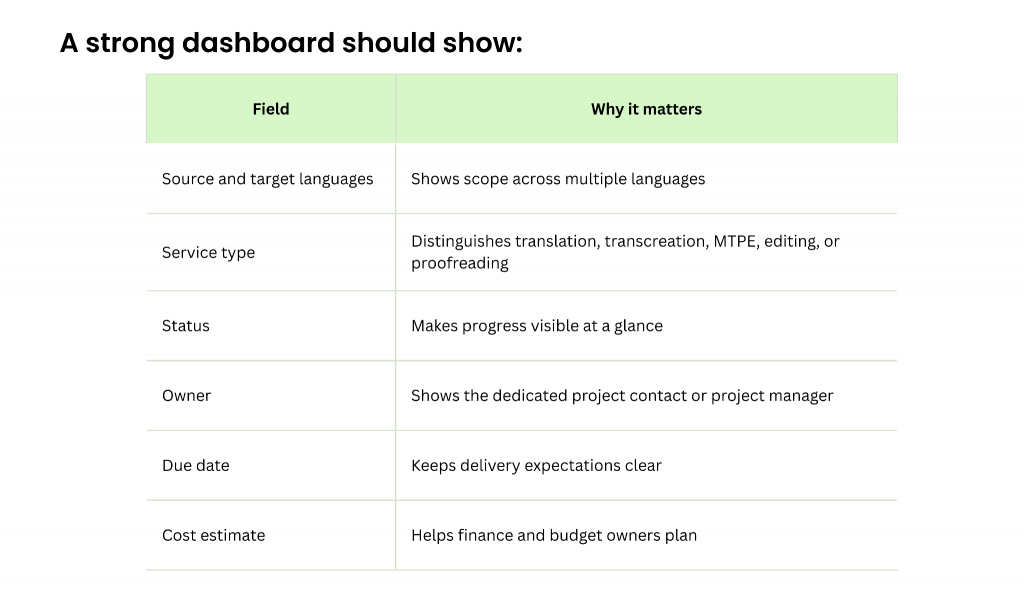
Status indicators such as “Received,” “In Translation,” “In Review,” and “Delivered” give clients full visibility without overwhelming them. The client can monitor translation stages such as editing and proofreading, which is especially useful for regulated or high-value content.
In Awtomated, LSPs can also surface reporting such as average turnaround time, spend by department, and volume by language pair. This gives account managers better data for quarterly business reviews and gives clients better control over their localization spend. Awtomated’s client relationship management tools keep that data connected to every project and contact in one place.
Self-Service Quote Requests and Ordering
Clients should be able to submit a new request directly from the portal. That means they can upload files, paste source text, choose source and target languages, set delivery expectations, attach reference materials, and specify the kind of translation service they need.
Centralized project management allows submission from one secure location. Clients can upload documents to receive automated cost estimates in client portals. In Awtomated, uploaded files can be analyzed for word count and matched against translation memory, helping agencies provide professional quotes faster and with more consistency directly through the portal.
A good intake form should collect:
- source language and target languages;
- requested delivery date;
- domain, such as legal, medical, marketing, or technical;
- tone and style notes;
- reference documents;
- preferred workflow;
- purchase order or cost center, if needed.
Integrated AI workflows balance speed, cost, and quality in translations. For example, an LSP may offer human translation for legal content, MTPE for internal documentation, and transcreation for campaign copy. The portal makes these options easier to present clearly, without a long back-and-forth email exchange for every small job.
Depending on the agency’s business model, ordering can support per-project work, retainers, monthly accounts, or bundled services.
Secure File and Terminology Management
Clients trust translation agencies with contracts, product roadmaps, HR policies, financial reports, medical records, and unpublished marketing campaigns. That trust depends on secure file handling.
Portals use encryption to comply with regulations like GDPR or HIPAA. Translation portals use ISO-certified infrastructure for secure file handling, and many enterprise buyers ask specifically about standards such as ISO/IEC 27001. Secure file exchange is protected by SSO, MFA, and encryption.
A secure portal should include:
- encrypted upload and download;
- role-based access;
- version history;
- access logs;
- controlled permissions by team, department, or cost center;
- organized storage for source files, final translations, and reference materials.
Centralized file management eliminates the need for email attachments in client portals. This is not a small improvement. It changes how safely and reliably teams work.
Translation management systems support translation memory and glossaries. In Awtomated, client-specific glossaries and translation memories can be connected to the workflow, so teams can reuse approved terminology for product catalogs, UI strings, legal templates, and brand language.
Translation Memory ensures consistency across multilingual content. That consistency is one of the clearest ways clients experience quality over time.
Client portals provide secure access with unique usernames and passwords. Each user in AvantPortal has a unique username and password. In Awtomated, user permissions are managed through role-based controls, so the right people can see the right projects, documents, quotes, and invoices.
Real-Time Status, Notifications, and Collaboration
The strongest portals do not make clients wonder what is happening. The Translation Portal provides real-time tracking and milestone alerts. Real-time tracking keeps users updated on project status. Real-time tracking provides updates on project status. Real-time tracking enhances visibility in translation projects.
This should include milestone updates such as:
- request received;
- files reviewed;
- linguist assigned;
- translation in progress;
- editing in progress;
- proofreading in progress;
- client review requested;
- delivered.
Milestone alerts keep users informed about delivery timelines. Users can access real-time updates on ongoing projects, whether they are in London, New York, Berlin, Singapore, or anywhere else.
Collaboration matters too. Instead of a comment about one sentence living in an inbox and a scope change living in another thread, the portal should keep messages attached to the relevant project. In Awtomated, account managers and project managers can respond directly in the portal, so the full communication history stays in place.
That makes it easier to answer questions such as:
- Who approved the quote?
- Which file was final?
- When did the client request a change?
- Was the glossary updated?
- Did the deadline move?
For clients, this creates confidence. For your team, it protects context.
Billing, Invoices, and Budget Visibility
Finance and procurement teams need the same clarity as project requesters. A modern client portal should consolidate quotes, purchase orders, invoices, and project history in one view.
Users can manage invoices and project history in one account. They should be able to filter by:
- date range;
- department;
- cost center;
- language pair;
- project owner;
- service type;
- invoice status.
Awtomated can support finance workflows through invoice management, exports, and integrations with accounting tools. CSV and PDF exports make month-end reconciliation easier, while transparent pricing history reduces basic billing queries. To understand what Awtomated costs for your team size and workflow, see Awtomated’s pricing.
A useful reporting view might show “Q1 2026 Marketing Spend by Language” or “Legal Translation Costs by Cost Center.” That kind of visibility gives clients better internal control and gives your company stronger conversations around value, not just price.

How a Client Portal Helps You Manage Multilingual Projects at Scale
A portal is not only a convenience feature. It is what allows LSPs to manage multilingual projects with less chaos as clients add departments, content types, regions, and languages.
Centralized project management improves translation workflow efficiency. Centralized platforms streamline project management for translation services. When every request starts in the same place, your team can create predictable workflows, assign work faster, and reduce manual handling.
This matters when one client has marketing, legal, HR, product, and support teams all sending multilingual content at the same time. Without a portal, each department creates its own habits. With a portal, you create one shared operating model.
Awtomated can automate routing by language pair, subject matter, client rules, and service type. That means a legal contract can follow one workflow, a campaign landing page another, and product UI strings another.
Consistent Workflows Across Departments and Regions
A portal lets you define repeatable workflows such as:
- Translation → Editing → Proofreading → Client Review → Delivery
- Translation → Legal Review → Final Approval
- MTPE → QA → Client Review
- Transcreation → Brand Review → Delivery
Role-based workflows control access and approvals in translation systems. Role-based workflows control access and approvals in management tools. This is essential when one user can submit a request, another must approve the quote, and another needs only finance visibility.
Customizable workflows align with team operations in management tools. Customizable workflows align with team operations for better management. In Awtomated, LSPs can create workflow templates per content type, client, or language combination.
For example:
- marketing content can include brand review;
- legal texts can require in-house counsel approval;
- HR policies can need regional sign-off;
- product content can include terminology QA before delivery.
The result is better control, fewer missed steps, and more predictable delivery. Standardization does not make the work less personal. It makes the work easier to trust.
Improved Transparency for Global Stakeholders
Global teams rarely work in the same office or time zone. Someone in Berlin may submit files before logging off. Someone in Singapore may need to review them hours later. Someone in New York may need cost visibility before approving the next batch.
With a portal, every user can log in, check status, find the latest file, and see what needs attention. They do not have to wait for the project manager to wake up or search for an old email.
Awtomated supports role-based views, so executives can see KPIs while daily users see task-level details. That keeps the portal useful for different kinds of stakeholders without exposing unnecessary information.
For a global SaaS platform launching across Europe, LATAM, and APAC, this is the difference between a launch that feels coordinated and one that depends on individual people remembering every detail.
Setting Up a Translation Client Portal with Awtomated
Setting up a translation agency client portal does not need to be a custom development project. With Awtomated, the focus is configuration, rollout, and adoption.
Whether you are moving from spreadsheets and email or replacing a legacy portal from the early 2010s, you can start with a focused setup and expand over time. Many LSPs can launch a basic portal in days, then refine workflows over the following weeks. If you are still in the earlier stages of building your agency from the ground up, a client portal is one of the first client-facing systems worth planning for.

Step 1: Define Client Use Cases and Access Levels
Start with 3–5 priority use cases. Do not try to configure every possible workflow on day one.
Good starting points include:
- rush marketing translation;
- recurring legal contracts;
- product UI updates;
- monthly e-commerce catalog updates;
- HR policy localization.
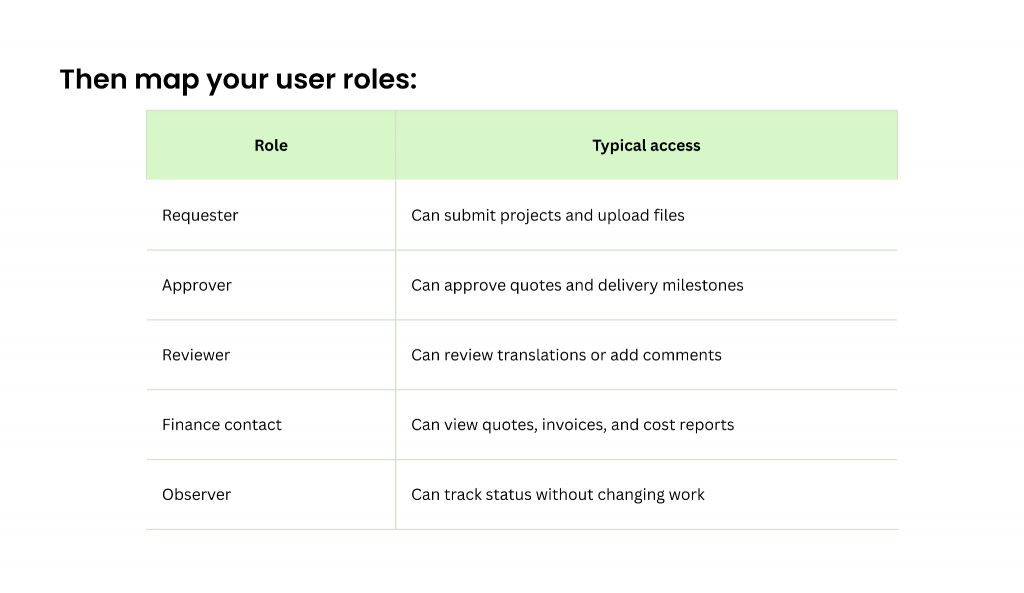
Awtomated supports role-based access so each client user sees only the relevant projects and financial data. This protects privacy and avoids confusion.
Before touching settings, interview two or three key clients. Ask what they need to find, what slows them down today, and what would make the portal genuinely useful. Put the answers into a simple requirements sheet. That document will keep your setup practical.
Step 2: Configure Workflows, Templates, and Branding
Next, configure workflows for your most common project types. For example:
- website localization;
- e-learning translation;
- technical manuals;
- legal contracts;
- marketing campaigns;
- software strings.
Create request forms with required fields so clients provide the right information upfront. This is where many agencies gain immediate value. If your current process depends on follow-up questions, structured intake forms can remove a large portion of that work.
Awtomated also lets you apply your agency’s branding, including logo, colors, and a custom domain such as portal.youragency.com. Clients should feel they are entering your company experience, not a disconnected third-party tool.
Keep the user experience clear. A portal should feel intuitive. A client should know where to click, where to upload files, where to review quotes, and where to contact your team.
Step 3: Integrate with Existing Tools and Systems
Integrations increase adoption because they reduce duplicate work. Start with the systems that create the most friction today.
Common integration priorities include:
- SSO through Azure AD, Okta, or similar identity providers;
- accounting and invoicing tools;
- CAT tools and third-party translation systems;
- email notifications;
- reporting exports;
- content systems or CMS platforms.
Awtomated supports integrations across finance, CAT tool, and business management workflows. Starting with one or two high-impact connections is usually better than attempting everything at once.
For many LSPs, SSO and accounting export are the best first steps. SSO makes access easier for enterprise clients. Accounting export reduces manual finance work.
Before inviting clients, test basic scenarios:
- new user login;
- project creation;
- file upload;
- quote approval;
- notification delivery;
- invoice export;
- permission limits.
A small amount of testing prevents a lot of launch-day questions.
Step 4: Pilot with a Small Group of Clients
Choose one to three existing clients with regular translation projects and invite them into a 4–6 week pilot. These should be clients who will give honest feedback and use the portal often enough to reveal real behavior.
During the pilot, watch for:
- how often users sign in;
- where they get stuck;
- which fields they skip;
- whether approval time improves;
- whether email volume decreases;
- whether finance users can find invoices easily.
Awtomated can help capture usage data such as login frequency, project volume, and average approval time. Combine those numbers with short interviews after the first month.
For example, a client might cut approval time from three days to 18 hours simply because the right approver receives alerts and can review the quote from one place. Those are the early wins that make adoption easier.
Step 5: Roll Out and Train Client Teams
Once the pilot is working, roll out the portal to a broader client base. Do not just send a link and hope people use it.
A simple rollout plan might include:
- an announcement email;
- a short explainer video;
- 30–45 minute onboarding sessions;
- role-specific guides for requesters, approvers, and finance contacts;
- screenshots for common actions;
- a clear support contact.
Show users how to:
- create a request;
- upload documents;
- approve quotes;
- track delivery;
- download final files;
- manage invoices;
- find project history;
- update account details;
- log out securely.
Awtomated’s interface is designed to be intuitive, but training still matters. Familiar habits are strong. The easier you make the first experience, the faster clients will adopt the portal.
Measuring the Impact of Your Client Portal
A portal should make work better in measurable ways. If you cannot show the impact, it becomes harder to prove ROI internally or to clients.
Awtomated surfaces analytics directly in the portal, making it easier to report on performance from Q3 2025 onward into 2026. Review results quarterly and adjust workflows, templates, and training based on what the data shows.
Useful KPIs include:
- time-to-quote;
- time-to-approval;
- on-time delivery rate;
- percentage of projects submitted through the portal;
- number of support emails per project;
- rework rate;
- invoice query volume;
- client satisfaction score.
In one interpreter scheduling portal case study, moving away from email and Excel reduced administrative workload by about 60%, according to Suretek Infosoft. Your numbers will depend on your workflow, but the principle is the same: when the system carries more of the coordination, people can focus on higher-value work.
Operational Efficiency Metrics
Operational KPIs show whether the portal is reducing friction inside your agency.
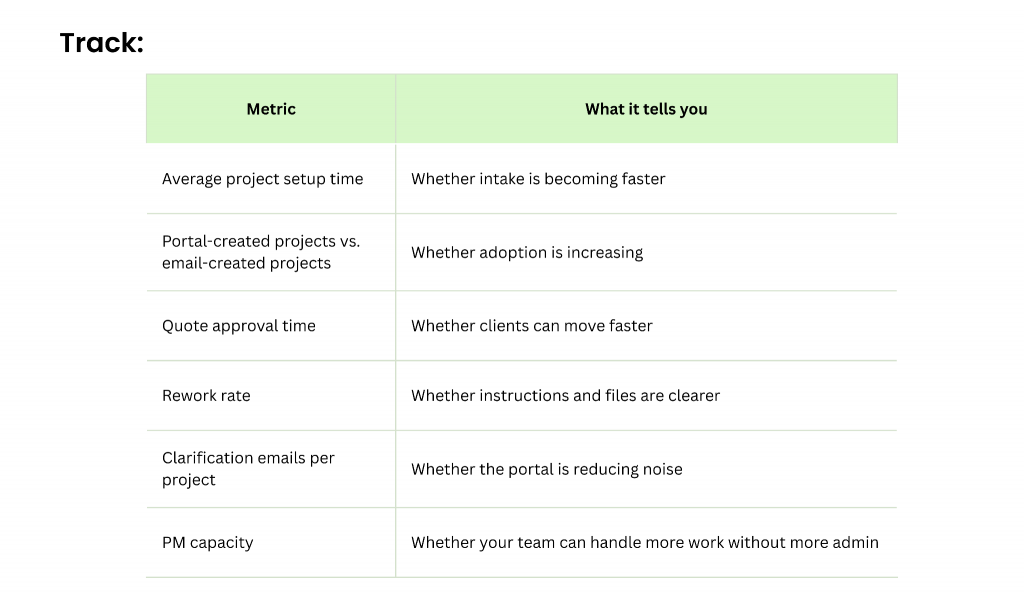
Awtomated can automatically log events and display them in dashboards for operations managers. This helps you understand whether streamlined workflows are actually working.
These metrics can also support staffing decisions, SLA conversations, and client business reviews. Instead of saying “the portal is helping,” you can say, “Approval time dropped by 42% after rollout,” or “Support emails per project fell from nine to three.”
Client Satisfaction and Retention
Efficiency matters. But client experience matters just as much.
Collect feedback after delivery with short surveys inside the portal. Track CSAT or NPS before and after implementation. Look at whether clients add more languages, use more services, or invite more internal users.
Improved transparency and self-service tend to reduce churn because clients feel more in control. They know where to find information, they can see what is happening, and they do not need to chase your team for every update. For a closer look at how portal quality connects to retaining long-term clients with a great experience, see our guide on winning retainer clients.
Awtomated’s portal also gives account managers better data for QBRs. You can show volume trends, spend by department, delivery performance, and terminology reuse. Over 6–12 months, those insights help reposition your agency from a vendor that “does translation” to a partner that helps manage multilingual operations. That value multiplies when your CRM and client portal work together — giving your account team a complete view of every client relationship in one system.
If your clients are already asking for more visibility, faster quotes, cleaner invoicing, and secure access, that is the signal. The next step is not another spreadsheet. It is a better system.
Ready to create a branded client portal for your LSP? Explore Awtomated’s Translation Business Management Software and see how your agency can bring projects, people, files, quotes, and reporting into one place. Or book a demo to see it working on real translation projects from day one.
FAQ
This FAQ covers common questions LSP owners and operations leaders often ask before launching a client portal.
Is a client portal only necessary for large translation agencies?
No. Portals benefit agencies of all sizes, from small boutique LSPs to large multinational providers.
A five-person agency can use Awtomated’s portal to look more professional, reduce admin overhead, and give clients a clearer experience. In fact, smaller agencies often feel the impact fastest because every saved email and every automated request frees up limited project management capacity.
You can start simple with core features such as project submission, status tracking, file delivery, and invoices. As your agency grows, you can add more workflows, integrations, and reporting.
How secure is a translation client portal built with Awtomated?
Awtomated is designed with enterprise-grade security features, including encryption in transit and at rest, role-based access controls, and support for secure authentication workflows.
Awtomated can support single sign-on, multi-factor authentication, and controlled permissions so each user only has access to the projects, documents, quotes, and invoices relevant to their role. This is especially important for legal, finance, healthcare, and enterprise clients.
When evaluating any platform, ask for the latest security and compliance documentation. Your clients may need this before they sign a contract or approve the portal for sensitive content.
What if my clients still prefer email over a portal?
Some clients will prefer email at first, especially if they have used it for years. That does not mean the portal rollout has failed.
Start gradually. Let clients use the portal first to view status, download files, and access invoices. Then move quote approvals and new requests into the portal once they see the value.
Awtomated can help centralize information on the agency side even when some communication begins by email. Over time, clients usually adopt the portal because it is easier to find files, track work, and get answers without waiting.
How long does it take to launch a client portal with Awtomated?
A basic launch can often happen in a few days. A more fully configured rollout usually takes 2–4 weeks, depending on the number of workflows, integrations, client groups, and approval rules involved.
The fastest path is to start with your most common project types and your most active clients. Then expand once the first version is working well.
Awtomated’s onboarding process can guide configuration, testing, and initial training. The goal is not to wait for a perfect portal. The goal is to launch a useful one and improve it based on real usage.
Can I customize the look and feel of the portal for my brand?
Yes. Awtomated supports visual customization such as your logo, brand colors, and custom domain.
This makes the portal feel like a natural extension of your agency rather than a separate tool. Clients sign in to a branded environment that reinforces your company and your service experience.
Some deeper interface changes may be limited to protect usability and maintainability. In practice, that is usually a good thing. The best portal is not the most customized one. It is the one clients can use confidently from day one.
Table of Contents
- What Is a Translation Agency Client Portal (And Why It Matters in 2026)?
- Why Your Translation Clients Now Expect a Client Portal
- Core Features of a Modern Translation Client Portal
- How a Client Portal Helps You Manage Multilingual Projects at Scale
- Setting Up a Translation Client Portal with Awtomated
- Measuring the Impact of Your Client Portal
- FAQ
Ready to manage your Translation company easily?
Get Started for Free