Translation Invoice Software for LSPs: How to Stop Invoicing in Excel and Get Paid Faster
Introduction: Why LSPs Need Translation Invoice Software Now
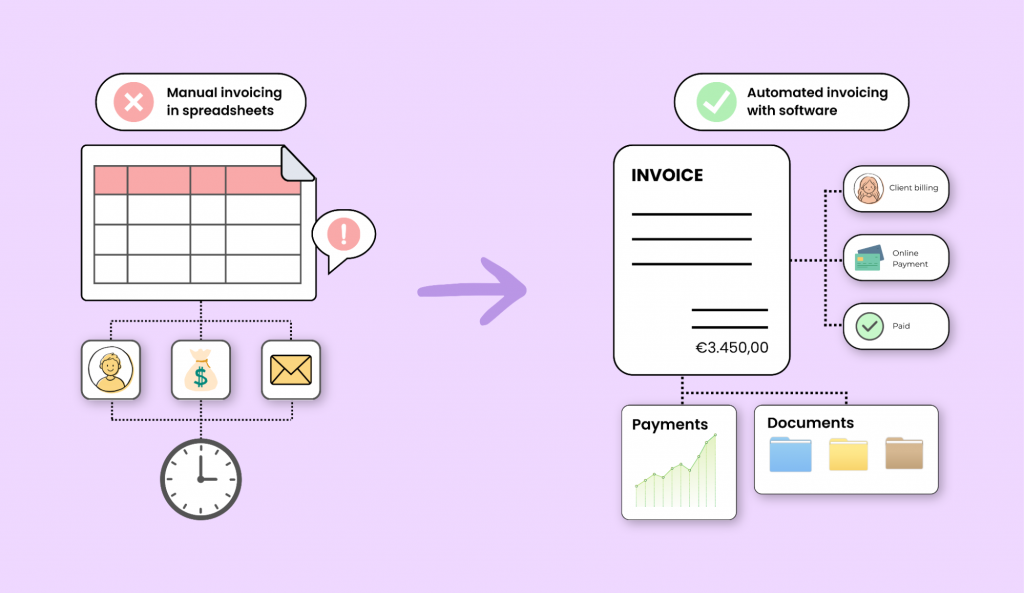
Many language service providers still bill from excel sheets, Word files, a pdf, or a reused translation invoice template. It feels familiar, until 80 monthly jobs, three currencies, five translators, and one missing PO turn billing into a hassle.
In 2026, translation invoice software is no longer “nice to have.” For small businesses and mid-size LSPs, modern invoicing software protects cash flow, reduces manual data entry, and shortens DSO. A healthy professional-services DSO is often 35–50 days; over 60 days creates pressure on finances and compensation cycles.
Common blockers:
- Per-word calculations, word count errors, and outdated pricing.
- Forgotten rush fees, certification fees, additional fees, and additional costs.
- Slow approvals from international clients.
- No single source of truth for project, invoice, receipt, and payments.
Awtomated is built to solve this by connecting translation work, clients, translators, and billing in one translation business management system — where finance is a core module, not an afterthought.
From Excel Chaos to Automated Invoices: What Changes for an LSP
Picture a 10-person LSP consolidating 40–100 jobs each month. A project manager copies the language pair, service, word count, base rate, and discount into invoice templates. Another user edits the wrong version. A formula breaks. An attachment gets lost.
With Awtomated, completed jobs become draft invoices. The data is already there: source language, target language, CAT discounts, rush status, due date, and client account settings.
- Excel-based invoicing: version conflicts, hidden formula errors, late billing, little transparency. These are signs your operations are costing you money without anyone noticing.
- Awtomated-based invoicing: automation, controlled templates, audit trails, faster processing, professional invoices.
Key Features LSPs Should Look For in Translation Invoice Software
Generic tools rarely understand the translation industry. The key features should match how LSPs actually sell translation services, localization, revision, MTPE, DTP, and legal documents.
Translation invoice software falls into two categories: LSP business management platforms that connect projects to invoices, and AI-powered business translation platforms focus on translating invoice text. Some AP tools help too: Advanced Optical Character Recognition can read invoices in multiple languages, and Invoice OCR and AP Automation software reads and extracts data from foreign invoices.
Look for:
- Rate cards by language pair, service, volume, and minimum fees.
- Invoicing software can automate calculations for per-word pricing.
- Dynamic billing models support flexible pricing structures for translation services.
- Invoice templates with PO numbers, VAT, GST, and client-specific terms.
- Multilingual support for invoices is essential for global clients.
- Translation memory capabilities speed up translation time; machine learning helps eliminate manual errors during translation processes.
- Terminology glossaries ensure consistent financial and tax terminology.
Awtomated as Your Translation Invoice Engine (Not Just a Template)
Awtomated is not just a template library. It is translation business management and workflow management software where every project can create billing data automatically.
Awtomated helps LSPs:
- Pull job data instead of copy-pasting from email or CAT tools.
- customize branding, logo, payment terms, and invoice templates.
- Generate consolidated invoices, such as all February 2026 services for one global company in one pdf.
- Keep templates structured while giving users flexibility.
- Support developers with integrations where business needs require them.
Handling Translation-Specific Complexity: Rates, Fees, and Extras
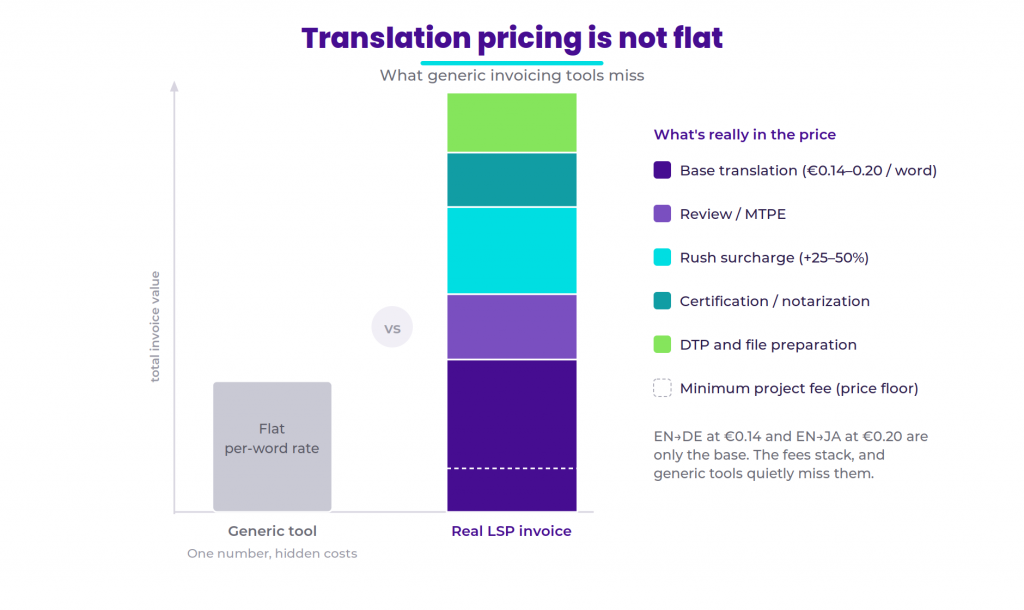
Real translation pricing is not flat. EN→DE may be $0.14 per word, while EN→JA may be $0.20. Review may be hourly, certified translation may be per page, and machine translation post-editing may use a separate pricing model. Getting this right starts with pricing translation services correctly before anything hits an invoice.
Templates should accommodate rush fees of 25-50% extra. Awtomated can apply those automatically from deadline metadata instead of hoping someone remembers.
Typical fee types:
- Base translation fee.
- Review, proofreading, or MTPE.
- rush fees and expedited delivery.
- Minimum project fees.
- certification fees and notarization.
- DTP, formatting, and file preparation.
Templates must allow for itemization of certification fees, and templates can include fields for certification and notarization fees so legal clients understand every charge.
Multi-Currency and International Clients: Getting Paid Across Borders
Invoicing in different currencies adds complexity to billing. A US client may want USD, an EU buyer EUR, and an APAC client JPY.
Awtomated supports global billing requirements:
- Invoice templates should support multiple currencies for global clients.
- Invoicing can be done in 25+ currencies, and software can support invoicing in over 25 currencies.
- Currency converter tools help quote in preferred currency.
- Templates support VAT for cross-border services within the EU, including reverse-charge wording where relevant.
- Store VAT IDs, tax fields, bank details, and exchange-rate date.
For EU tax validation, many teams also check official VIES VAT information.
From Job Data to Invoice: How Awtomated Connects Your Workflow
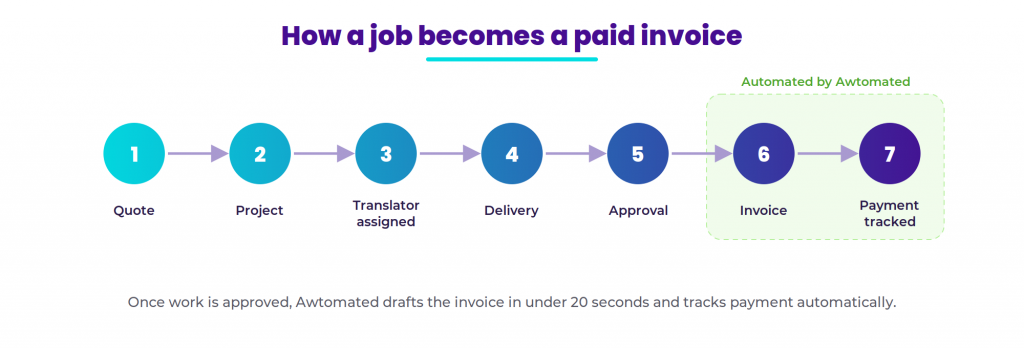
Awtomated follows the translation process: quote, project, freelance translator assignment, delivery, approval, invoice, payment tracking.
It can automate:
- Importing or entering word count once.
- Applying client rates and translator costs.
- Grouping jobs by month, client, or milestone.
- Creating draft invoices from approved work.
- Tracking vendor compensation beside client revenue.
- Recording transactions after payments are paid.
This saves time and reduces double entry across project and account records.
Customizable Invoice Templates for the Translation Industry
Effective templates include detailed line items for services. Use detailed line items to specify services and pricing, especially when clients approve many small jobs.
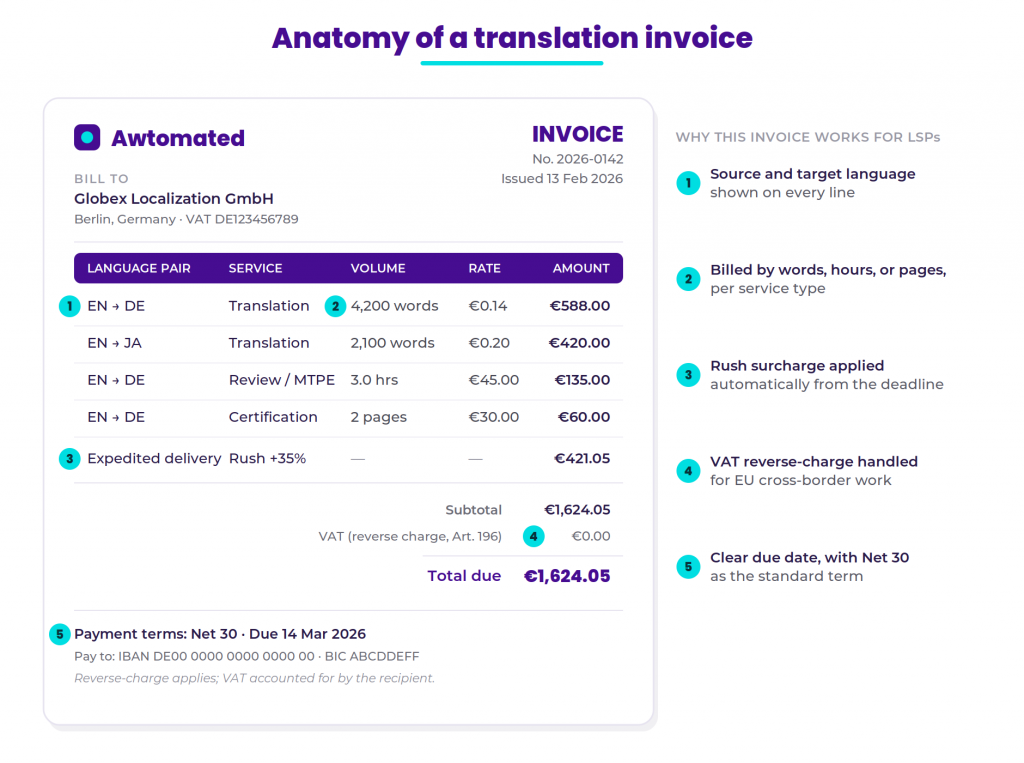
A strong translation invoice template should show:
- Source and target language; include fields for source and target language in templates.
- Service type: translation, revision, localization, MTPE.
- Volume: words, hours, or pages.
- Unit price, line total, tax, and total.
- Clear due date on every invoice.
- Net 30 as the standard: aim for Net 30 payment terms as a standard.
- Specific payment terms for ongoing projects.
Good teams also use templates to support different layouts for enterprise procurement and small businesses.
Payables for Freelance Translators: Vendor Invoices and Payouts
LSPs issue client invoices, but they also pay freelance translator networks. Awtomated keeps both sides connected.
Because the same data powers client billing and translator payables, owners can see margin by project, language, and service. Payables can be exported to accounting tools or bank files, reducing payout errors across currencies. Awtomated’s finance management tools keep both sides of this equation visible in one place.
Reporting: Revenue, Margins, and Cash Flow for LSP Owners
Reporting is not decoration. It is how owners see whether the company is growing profitably.
Awtomated’s detailed reports support financial tracking by:
- Revenue by client, language pair, service, and date.
- Margin by project after translator costs — the foundation of understanding your per-project profitability.
- Open invoice totals and aging.
- Average payment time and DSO trend.
- Forecast cash flow from unpaid invoices.
Track unpaid invoices and follow up on late payments before they become 60- or 90-day problems.
Security, Compliance, and Data Integrity in Financial Workflows
Financial data in translation often includes contracts, bank details, tax IDs, and sensitive documents. Data privacy compliance is crucial for software handling sensitive documents.
Awtomated supports:
- Role-based permissions for PM, finance, admin, and client users.
- Logs showing who created, edited, and approved each invoice.
- Secure storage for bank and tax data.
- GDPR-aware controls for EU clients.
- Consistent terminology across legal and finance fields.
How Awtomated Helps You Get Paid Faster
The fastest invoice is the one that is accurate the first time. Awtomated helps create invoices in under 20 seconds when project data is ready, and automated payment reminders can ensure timely payments. For a full picture of how to approach automating your invoicing workflow, see our agency automation guide.
Ways Awtomated accelerates payments:
- Same-day invoice generation after delivery.
- Standard Net 30 or Net 15 terms.
- Clear due date and payment instructions.
- Detailed services, fees, and taxes.
- Fewer disputes over word count or rush work.
- Automated reminders before and after the due date.
- Better receipt and reconciliation tracking.
Automated translation improves turnaround time for invoicing when invoice notes must translate across regions, but Awtomated is not a google translate wrapper; it manages the business workflow behind the language work.
Choosing Translation Invoice Software: Evaluation Checklist for LSPs
Before choosing a solution, compare capabilities against your real business needs:
- Does it support complex rate cards, minimums, and discounts?
- Can you customize invoice templates without breaking data integrity?
- Does it support 25+ currencies and international clients?
- Can it integrate with CAT tools and accounting tools?
- Is it user friendly for PMs, finance, and translators?
- Does it scale from 3 users to 50?
- Does it provide reporting, margin visibility, and overdue tracking?
- Does it reduce manual data entry rather than hiding it?
Prioritize software built for the translation industry, not a generic invoice app with a few custom fields. When you are ready to compare options, see Awtomated’s pricing to understand what a purpose-built platform costs at your scale.
Conclusion: Modernize Your Invoicing and Free Your Team to Focus on Translation
Moving from Excel to translation invoice software is one of the fastest ways to improve cash flow, reduce admin work, and get paid with less chasing.
Awtomated connects projects, linguists, clients, templates, and payments so your team can free time for translation, not spreadsheet repair.
Book a demo or start a trial of Awtomated to see how automated invoicing works on real translation projects.
Table of Contents
- Introduction: Why LSPs Need Translation Invoice Software Now
- From Excel Chaos to Automated Invoices: What Changes for an LSP
- Key Features LSPs Should Look For in Translation Invoice Software
- Awtomated as Your Translation Invoice Engine (Not Just a Template)
- Handling Translation-Specific Complexity: Rates, Fees, and Extras
- Multi-Currency and International Clients: Getting Paid Across Borders
- From Job Data to Invoice: How Awtomated Connects Your Workflow
- Customizable Invoice Templates for the Translation Industry
- Payables for Freelance Translators: Vendor Invoices and Payouts
- Reporting: Revenue, Margins, and Cash Flow for LSP Owners
- Security, Compliance, and Data Integrity in Financial Workflows
- How Awtomated Helps You Get Paid Faster
- Choosing Translation Invoice Software: Evaluation Checklist for LSPs
- Conclusion: Modernize Your Invoicing and Free Your Team to Focus on Translation
Ready to manage your Translation company easily?
Get Started for Free