Google Sheets Was Never Built for Vendor Rates: Where Translation Agency Spreadsheets Break Down

Every translation agency starts the same way: a handful of clients, a small pool of translators, and a collection of spreadsheets that somehow hold everything together. But what happens when those spreadsheets become the system running your entire business? Here is where things go wrong-and what to do about it.
Key Takeaways
- Google Sheets and Microsoft Excel were never designed to handle complex vendor rate cards with per-service, per-language-pair, per-client pricing, minimum fees, surcharges, and multi-currency margins at professional use scale.
- Most translation agencies still run quoting, vendor selection, finance, and reporting out of multiple excel spreadsheets, leading to hidden losses of 12–18% in margin leakage, misquotes, and delayed vendor payments.
- Translation-specific challenges-rate cards per service, per language pair, per client, plus minimum fees, rush surcharges, and fuzzy-match discounts-push spreadsheets well beyond their intended limits.
- Awtomated is a Translation Business Management System (TBMS) built to replace those fragile spreadsheets with a single connected system covering projects, vendors, finance, and reporting.
- The rest of this article maps out the concrete failure points of translation agency spreadsheets and shows how a TBMS like Awtomated fixes them without losing the flexibility agencies value.
Why Translation Agencies Fall Back on Spreadsheets in the First Place
In 2024–2026, the typical small-to-mid-sized LSP runs on an "Excel everywhere" setup: one excel file for vendor rates, another for client pricing, a separate sheet for project tracking, and ad hoc documents for POs and invoices. Translation agencies often rely on spreadsheets for managing projects before scaling to a TMS or TBMS-and for good reason.
- Spreadsheets have low barriers to entry and require no expensive licensing fees for agencies. A company can start with a free Google Sheets account and a computer, and be tracking projects by lunchtime.
- Spreadsheets serve as a flexible and low-cost tool. They can be customized to fit unique workflow requirements-add a column here, a dropdown menu there, conditional formatting to highlight project status based on deadlines.
- Cloud-based spreadsheets allow for real-time collaboration among team members. Google Sheets makes it tempting to treat one sheet as the "database" for translators, target languages, and rates, even though it has no real data validation or business logic.
- A master project log is central to tracking translation projects. Spreadsheets can track project metadata including project ID and client name, and agencies can create comprehensive directories of freelance translators and editors in spreadsheets. Maintaining separate sheets for different aspects of project management helps organization.
- Spreadsheets are commonly used to monitor deadlines and track project stages in translation. They work well enough when you manage fewer than 50 vendors and 10 language pairs.
Now picture a 15-person agency managing 300+ vendors, 40+ language pairs, and 70+ active projects per month using 5–10 interconnected excel files with manual cross-references. That is where the same spreadsheets become the bottleneck for quoting, job assignment, and finance.

Where Google Sheets and Excel Break Down for Vendor Rates
Translation vendors rarely have a single flat rate. The translation process requires different rates per language pair (EN→DE vs EN→JA), per service (translation, editing, MT post-editing, DTP), and sometimes per client or subject field.
- Agencies try to store this in one big excel spreadsheet: columns for source language, target language, service, specialization, currency, price per word, minimum fee, discounts, and custom notes. Every new row and column makes the file heavier and harder to manage.
- Duplicated vendor names are a common problem. Without using standardized naming conventions to prevent duplicate entries, you end up with "John Smith," "Smith, John," and "J. Smith" pointing to three different rows-or worse, the same person.
- Inconsistent target languages codes ("DE," "Ger," "German") break lookups. While data validation and dropdowns eliminate typos in fields like status and languages, most agencies never implement them consistently across all sheets.
- Dropdown menus in spreadsheets can manage workflow status of translation jobs, but they cannot enforce relational logic. Using formulas for totals helps reduce human math errors, yet lookup formulas like VLOOKUP, XLOOKUP, and INDEX/MATCH become fragile when staff sort or filter the sheet. One misaligned row means a quote based on the wrong vendor rate or wrong currency.
- In Google Sheets, shared editing often leads to accidental overwrites. One PM changes a vendor rate for a specific client, and another PM unknowingly reuses that rate for all clients-there is no access control per cell or per context.
Awtomated stores vendor rates in a structured database: separate objects for vendors, services, language pairs, and price lists, so individual changes do not corrupt the whole system.
The Hidden Cost of Spreadsheet-Based Quoting
Quotes are where margin is either made or lost. Agencies may use spreadsheets to manage financial data like project pricing and profitability, but every manual step introduces risk.
- A typical workflow: PM exports word counts from a CAT tool, pastes them into an excel file, manually pulls vendor rates from another sheet, converts currencies, adds agency markup, and prepares a quote in a Word document or PDF. Each copy-paste, rounding, or cell formula is an opportunity for error.
- A missed minimum fee or incorrect target languages selection can underquote by hundreds of euros. For example, a 50,000-word e-commerce catalog project into 8 different languages was misquoted in 2025 because the PM forgot to update the vendor rate for EN→FR in the master spreadsheet. A difference of €0.02 per word across 10,000 words per language meant roughly €1,600 in lost margin.
- Translation services like translation + revision, MT post-editing, and DTP each need valid vendor costs behind them, but most Excel quotation templates do not enforce this. AI-powered tools provide instant translation suggestions and AI translation can reduce costs by up to 70%, while using AI can speed up translations by 60%-but none of those savings matter if the pricing model feeding your quote is wrong.
- Using translation memory can boost productivity by 10% to 60%, yet spreadsheets have no mechanism to factor TM leverage into cost calculations automatically.
- Spreadsheets do not show real-time profitability. A PM can send a quote without knowing whether chosen vendor rates leave positive margins after payments and overheads.
Awtomated automates this: word counts pulled from integrated CAT or machine translation tools, vendor rates applied based on rules, markups calculated automatically, and per-project profitability visible before sending the quote.
Multi-Currency, Multi-Language Chaos in Excel Files
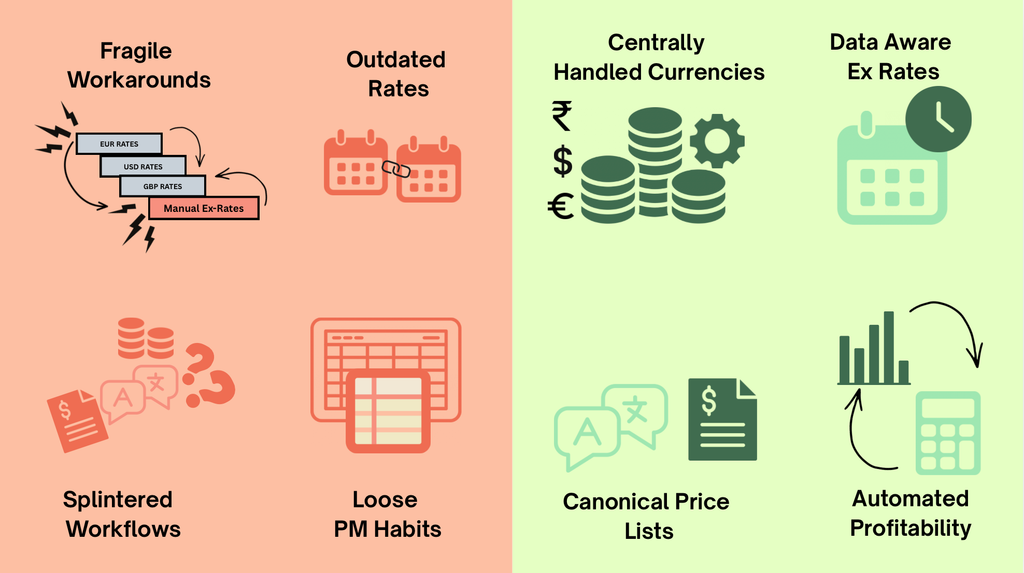
Serious LSPs pay vendors in EUR, USD, GBP, or local currencies while billing clients in a different currency. Multilingual spreadsheets try to handle this with fragile workarounds.
- The common pattern: one tab for EUR vendor rates, another for USD, plus helper columns for converting into the client currency. Formulas depend on manually updated exchange-rate cells.
- Financial spreadsheets log client receivables and vendor payables in translation agencies, but exchange rates in the excel spreadsheet are often updated late-using January 2026 values for March 2026 projects leads to incorrect margin reporting and disputes at month-end.
- Multiple target languages per project compound things: one translated file per language, different vendors for EN→ES and EN→ZH, but the same client invoice. Orchestrating this via fragile linking of sheets is slow and error-prone.
- Conditional formatting can highlight project status based on deadlines, but it cannot enforce currency logic or date-aware rate lookups. Each new PM may add their own columns or formulas, creating consistency problems that grow over time.
Awtomated handles currencies centrally, logs exchange rates by date, references a canonical currency model for vendor and client price lists, and calculates per-language-pair profitability automatically.
Vendor Selection, Availability, and Capacity: Beyond What Spreadsheets Can See
Choosing the right vendor is more than finding the cheapest row in an excel spreadsheet.
- Typical translation agency spreadsheets capture static text data-rate per word, language pair, maybe a specialization field-but not dynamic data: current workload, vacation, recent quality issues, or on-time delivery rates.
- A PM filters a vendor-rate sheet for EN→IT, marketing domain, and selects the cheapest professional translators listed. What the sheet does not show: this linguist missed 2 deadlines last month.
- Some agencies add "last used" or "rating" columns, but without automated updating, those fields go stale. Quality assurance tracking is essential in maintaining translation standards throughout workflows, yet spreadsheets cannot automate it.
- ISO 17100 is an important standard for language service providers to follow, and compliance requires documented vendor qualifications and performance records-not ad hoc column notes.
- Maintaining a change log helps document translation decisions and client revisions, and version control is crucial in managing revised source files, but spreadsheets offer no built-in mechanism for either.
Awtomated stores vendor performance metrics-project history, quality feedback, on-time statistics, and capacity indicators-visible at assignment time. PMs get ranked vendor suggestions per target language and service, based on both rate and performance.
Finance and Compliance: Invoices, POs, and Approvals Don't Belong in Sheets
When translation agency spreadsheets handle money, the risk goes beyond inconvenience.
- Client invoices built in Excel using totals pulled from a project tracker; vendor POs stored as separate excel files in shared folders; payment status tracked in a "payments" spreadsheet. Agencies often have a management dashboard in spreadsheets to summarize projects and deadlines, but these dashboards rarely connect accurately to financial records.
- Typical failures include mismatched PO numbers, invoices sent without correct vendor costs attached, and double payment risk when different PMs update local copies of the same excel spreadsheet.
- Spreadsheets do not enforce approval workflows or roles. Anyone with edit access can change totals, dates, or statuses without leaving an audit trail. Minimal sensitive data should be included in spreadsheets to protect client information, yet rate and payment data routinely sits in unprotected files.
- A mid-sized LSP in 2024–2025 lost days each month-end reconciling vendor invoices with project spreadsheets because rates or quantities were edited post-delivery and logged nowhere.
Awtomated generates client invoices and vendor POs directly from confirmed project data with immutable histories. Finance teams see billed vs. paid amounts, overdue invoices, and vendor payment queues without downloading or merging multiple excel files.
Reporting and Profitability: What You Can't See in a Spreadsheet
Owners and operations managers need fast answers: profit by client, language, or time period. Translation agency spreadsheets struggle to deliver this promptly.
- While Microsoft Excel is powerful for ad hoc analysis, most agencies' real spreadsheets mix inputs, calculations, and comments on the same sheet, making reporting fragile. Pivot tables help, but they require clean data-and the data is rarely clean.
- Common questions that are hard to answer accurately from Excel: Which client had the best margin in Q2 2025? Which target languages are consistently unprofitable? Which vendors should get more work based on both cost effective rates and quality?
- To answer these, someone must export or download data, correct inconsistent language codes, and build charts or graphs-often hours of manual work each month. By the time the report is ready, the next quarter has started and money-losing language pairs persist.
- Planning for migration to a TBMS is advised for agencies as their volume grows, precisely because this reporting lag means flying blind.
Awtomated logs every project, task, vendor cost, and client invoice in one structured database and provides real-time profitability dashboards-margin by client, revenue per target language, top vendors by profit contribution-enabling faster decisions on pricing and resource allocation.
Integrations, Files, and Automation: Where Google Sheets Can't Follow
The modern translation stack includes CAT tools, translation memories, machine translation engines, email, and accounting software. Trying to orchestrate everything via spreadsheets leads to brittle workflows.
- Excel spreadsheets and Google Sheets cannot natively integrate with CAT tools, TM servers, or MT engines without custom scripts. PMs become human APIs-copying data between mailboxes, SaaS tools, and spreadsheets-resulting in delays and burnout.
- Specific pain points with excel translations: preserving formulas and formatting in xlsx files, ensuring each translated excel file is attached to the right job, and verifying which target languages are complete. While tools like Smartcat can translate Excel files into over 280 languages simultaneously and preserve 100% of Excel formatting and formulas, and Redokun translates Excel documents up to 60% faster while keeping original layout and styles in translated documents, and Smartling's Excel tool reduces manual file preparation effort and ensures all cell formatting remains untouched after translation-these are point solutions for file translation, not business management.
- Translated Excel files maintain original formulas and charts intact, and Excel translation tools can handle multiple tabs while preserving links. Redokun can save up to 90% in translation costs for certain workflows, and AI can translate Excel files in hours, not days. But none of these tools manage your vendor relationships, POs, or profitability.
- The real gap: you still need to upload source files, track completed translations, confirm delivery, create invoices, and manage the entire project lifecycle. Professional translation services require a system layer above individual file tools.
Awtomated is designed as a TBMS to sit at the center of the stack, integrating with email, MT engines, and CAT tools so tasks, files, and statuses sync automatically. Routine actions-sending task offers to vendors, reminding about deadlines, updating project stages-happen without touching an excel spreadsheet.

From Spreadsheets to TBMS: How Agencies Actually Make the Switch
Migration does not require shutting down operations or abandoning everything overnight.
- Start with a simple inventory: list all existing excel files and Google Sheets in use-vendor rates, project trackers, client price lists, invoices-and decide which should become structured data in Awtomated.
- Map vendor rate spreadsheets into Awtomated: create vendors, attach services and language pairs, import price lists, and assign currencies based on existing column and row structures in your xls or xlsx files.
- Run both systems in parallel for a few weeks. New projects go into Awtomated; legacy projects finish in spreadsheets. Once core processes-quoting, vendor assignment, and invoicing-are stable, retire specific excel files one by one.
- Awtomated's design feels familiar to spreadsheet-savvy PMs: tabular views, filters, and CSV exports are available, but with business rules and relationships enforced in the background. You can still download data to run custom analysis in your editor of choice.
- Set a concrete date-for example, "from 1 January 2027 all new translation projects are created only in Awtomated"-and click confirm on the decision as a team to avoid drifting back to unmanaged Google Sheets.
When Is It Time to Outgrow Your Spreadsheets?
Here are the signals that your spreadsheets have hit their limit:
- Scale signals: More than 50–100 active vendors, more than 20 target languages, recurring multi-language projects, or at least one full-time PM whose day is largely spent updating excel files instead of building client relationships.
- Operational red flags: Frequent misquotes, duplicated or lost vendor POs, manual re-entry of data across systems, and late visibility into project profitability. You cannot translate business goals into action when your system fights you.
- Cultural warning signs: PMs keeping private versions of the "main" spreadsheet, disagreements over which single file is the source of truth, fear of sorting or editing critical rate sheets because formulas might break.
- The bottom line: Once these symptoms appear, staying in spreadsheets costs more-in margin leakage, staff time, and lost accuracy-than adopting a dedicated Translation Business Management System. Consistent translations, reliable quoting, and direct access to profitability data should not depend on whether someone remembers to update a cell.
If your agency handles professional translation services across multiple language pairs and you are spending more time managing spreadsheets than managing your business, book a demo with Awtomated and see how the switch works in practice.
FAQ
Can we still use Microsoft Excel and Google Sheets after moving to Awtomated?
Yes. Agencies do not need to abandon excel spreadsheets completely. You can still use Microsoft Excel or Google Sheets for ad hoc analysis, exported reports, prompt investigations, and simple lists. The goal is to remove spreadsheets from mission-critical workflows-vendor rates, quoting, project control, finance-not to ban them from the company. Awtomated allows exporting data to excel files if managers want to run additional pivot tables or custom graphs outside the system.
How long does it typically take a translation agency to migrate off spreadsheets?
For small-to-mid-sized agencies, a phased migration to Awtomated usually takes a few weeks, not months. A typical timeline: 1–2 weeks for setup and vendor/client data import following clear instructions, another 1–2 weeks running new projects in parallel, and then progressive retirement of old excel files over the following month. Awtomated's support team can help design the migration plan so PMs keep delivering projects during the transition.
What happens to our historical data that currently lives in Excel spreadsheets?
Agencies can keep archived excel files for historical reference while importing key master data-clients, vendors, price lists, open projects-into Awtomated. Some agencies choose to import selected historical projects (for example, the last 12–24 months) to analyze profitability and client history directly in the system. Even if all historical projects are not imported, Awtomated quickly becomes the single source of truth for all new work, helping you accurately track every project going forward.
Does Awtomated work with CAT tools, machine translation, and existing excel translations?
Awtomated is built to sit alongside existing translation technologies: CAT tools, translation memories, and machine translation services. It orchestrates the creation of work and finances rather than replacing linguistic tools. Agencies can continue to produce a translated excel file or any translated file in their preferred tools; Awtomated manages projects, tasks, vendors, and financial flows around those files. As workflows mature, agencies can enable deeper integrations so project data and file statuses sync automatically, helping overcome cultural barriers between disconnected tools and reducing the amount of manual work copying between systems.
Is a TBMS like Awtomated only for large enterprises, or does it make sense for small agencies too?
Awtomated is specifically designed for small-to-mid-sized translation agencies currently stuck in email plus spreadsheets but starting to feel growth pains. Even a 5–10 person company with a modest user count can gain immediate benefits in quoting speed, margin visibility, and vendor payment accuracy. Adopting structured project, vendor, and finance management early prevents errors and habits that become cost effective to fix only before they compound-not after your agency has grown past the point of no return.

Building software that helps small and medium-sized language service providers run their business.
About Rishi →Table of Contents
- Why Translation Agencies Fall Back on Spreadsheets in the First Place
- Where Google Sheets and Excel Break Down for Vendor Rates
- The Hidden Cost of Spreadsheet-Based Quoting
- Multi-Currency, Multi-Language Chaos in Excel Files
- Vendor Selection, Availability, and Capacity: Beyond What Spreadsheets Can See
- Finance and Compliance: Invoices, POs, and Approvals Don't Belong in Sheets
- Reporting and Profitability: What You Can't See in a Spreadsheet
- Integrations, Files, and Automation: Where Google Sheets Can't Follow
- From Spreadsheets to TBMS: How Agencies Actually Make the Switch
- When Is It Time to Outgrow Your Spreadsheets?
- FAQ