Email to Project: Capturing Client Requests from Gmail and Outlook Without Copy-Paste
Most translation agencies still turn client emails into projects the hard way. A request arrives in Gmail or Outlook, and a project manager spends the next fifteen minutes saving attachments, copying language pairs into a spreadsheet, and hunting through forwarded threads for the actual deadline. At Awtomated, we built a better way.
Key Takeaways
A translation project intake process collects the information needed to scope and execute projects - files, target languages, deadlines, reference materials, and quality expectations. Most LSPs still do this manually, and the cost is real. Establishing a strong translation intake process prevents costly rework and improves workflow across every downstream step. Awtomated lets you convert Gmail and Outlook messages into fully scoped translation projects in a few clicks, without copy-paste.
Structured project intake directly from email improves project management, reduces admin for the project manager, and cuts the risk of missed requirements or wrong quotes. Effective project management improves translation accuracy and customer satisfaction - and it starts the moment a request hits your inbox, not when translation begins.
Awtomated automatically pulls files, deadlines, languages, and client data from the email thread, then guides users through a standardized intake form that captures brand voice, style guides, translation memory, and human review needs. This approach shortens response times - same-hour quotes instead of next-day - improves use of CAT tools and existing translation memory, and helps assign the best translators for each job. The article below walks through concrete intake fields, real workflow examples, and how to roll out "email to project" in a growing translation agency.
Why Email-Based Translation Project Intake Is Broken Today
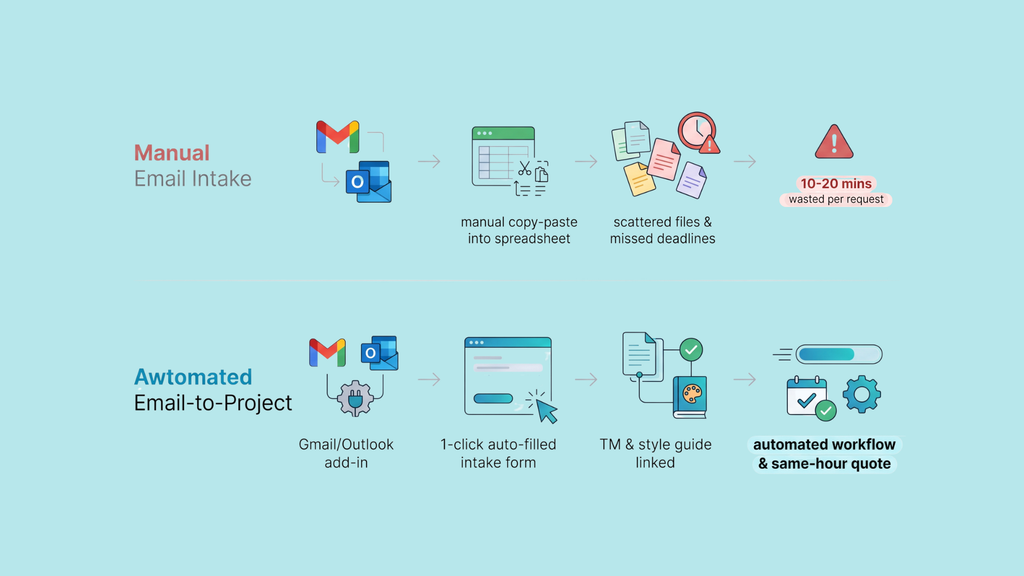
It is 2026, and a typical translation project still starts like this: a client sends an email with three Word documents, a vague subject line ("urgent - need in French and German"), and a deadline buried in the fourth paragraph of a forwarded thread from last month. The translation project manager opens the message, downloads the attachments, counts words manually, opens a spreadsheet, and starts typing. If the client forgot the style guide - and they usually did - that discovery happens two days later, mid-project.
This process is broken in predictable ways. Scattered information across email threads means forgotten attachments, unclear deadlines, and missing reference materials like glossaries, previous approved translations, and technical documentation. A clear project scope prevents translation project failures, yet most requests arrive without one. Vague scope leads to project delays and increased costs. Ambiguous briefs lead to misaligned tone and terminology errors that surface only during final delivery.
Manual copy-paste wastes 10–20 minutes per request. When a translation team is handling 30–50 projects per week during global expansion phases, that adds up to 5–17 hours lost weekly on data entry alone. The translation management software market grew by USD 1.58 billion from 2020 to 2025, largely because agencies recognized this waste. Effective communication prevents information loss in translation projects, but email was never designed to be a project management tool.
Typical risks include misquoted word counts, wrong language pairs, ignored internal reviewers, and lost instructions about brand voice or machine translation preferences. The rest of this article is a practical blueprint for turning email into a structured, reliable translation project intake flow using Awtomated's translation business management system instead of inbox chaos.
From Inbox to Intake: How Awtomated Connects Gmail and Outlook
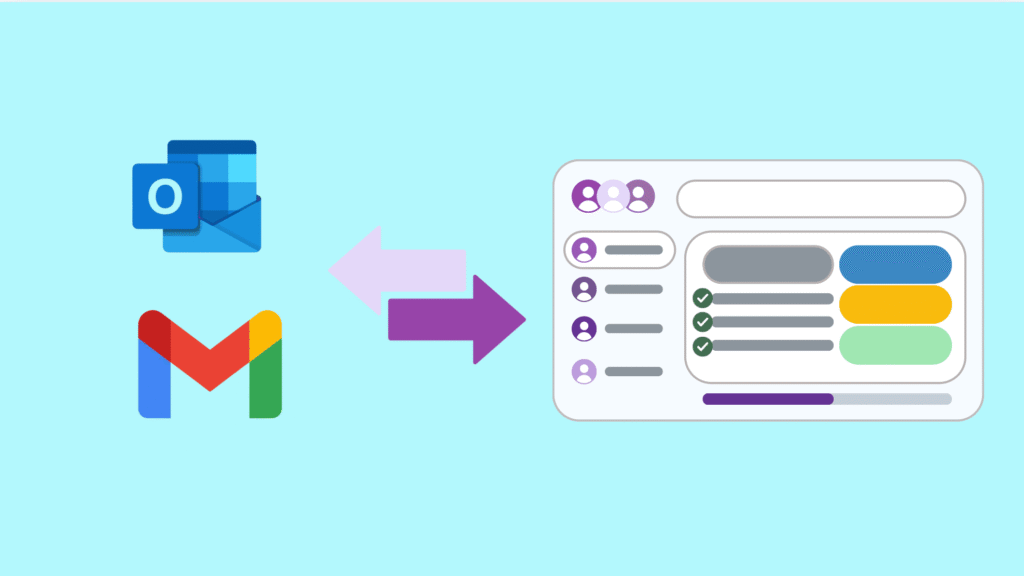
Awtomated offers native Gmail and Outlook integrations, so any client request can become a project or quote without leaving the inbox. AI-native platforms automate project intake and reporting processes, and Awtomated is built on that principle - with over 100 pre-built connectors that enable automated translations and project creation from the tools your team already uses.
The add-in appears as a side panel in Gmail or Outlook. When a client email arrives, the project manager clicks "Create project" or "Create quote" directly on that message. Awtomated automatically detects the sender, subject line, email body, attachments, and suggested due dates (for example, "by August 30, 2026") and pre-fills core intake fields. Even when clients forward chains spanning months, Awtomated groups those emails into a single request, reducing back-and-forth. A detailed brief prevents costly post-delivery corrections, and capturing that brief at the email stage is the correct workflow.
Consider two examples. A marketing agency sends a campaign launch brief with six InDesign files, three target languages, and a hard deadline tied to a product launch in new markets. The project manager clicks "Create project," and Awtomated pre-fills the language pairs, attaches the files, and surfaces the client's saved style guide. In a second scenario, a legal department forwards a batch of contracts needing translation into other languages with strict confidentiality. The same click triggers the intake form, but this time Awtomated surfaces fields for legal review, sensitive data handling, and regulatory constraints. Same process, different project details - no copy-paste either way.
Designing a Standard Translation Project Intake Form
A consistent intake template is critical because it aligns translation project management, vendors, and internal reviewers around the same data. Using a single, standardized intake form prevents critical information from being missed. A formal scope document defines languages, content type, and budget - and the intake form is where that document starts.
Core fields the form should contain:
- Client name and business unit
- Project name or campaign tag
- Source and target languages
- Estimated word count
- File formats (Word, PDF, HTML, InDesign, software strings)
- Requested delivery date, distinguishing "draft" from "final with review"
- Budget constraints or price tier (standard, rush, MT + post editing)
Advanced fields the project manager surfaces when needed:
- Content type and subject matter (marketing, legal, medical, software UI, eLearning, user generated content)
- Regulatory constraints and confidentiality level for regulated industries
- DTP, engineering, or formatting requirements
- Conference interpreting or voiceover needs, if applicable
Defining scope includes languages, content types, and deadlines - all captured here. A complete brief outlines scope and sets clear expectations for every stakeholder. Documenting delivery requirements ensures all stakeholders understand file formats and deadlines before translation work starts. In Awtomated, this form is configurable: the LSP admin can set fields as mandatory, optional, or hidden based on client profile or project type, keeping the interface clean with logical sections and short help texts.
Capturing Scope and Requirements Directly from the Email
This section focuses on what concrete scope details should be pulled or confirmed when turning an email into a project.
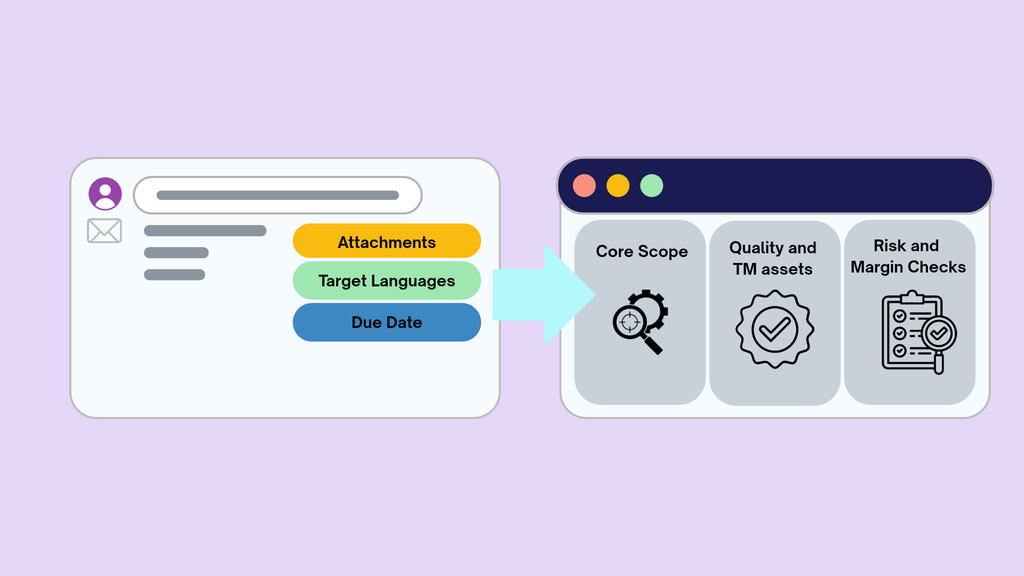
The key scope items include: which documents are in scope for translation, which are reference materials only, exact language pairs, expected volume, and whether DTP or engineering work is required. Addressing scope and change control during intake prevents scope creep in translation projects - so these distinctions matter from the first click.
Awtomated parses and lists attachments from the email, allowing the project manager to mark each file as "To translate," "Reference only," or "Client TM / glossary." Early file auditing helps determine whether source content is final and correct, and pre-processed files allow translators to focus on quality rather than fixing formatting issues. Subject lines like "May 2026 product catalog update" can be mapped to project tags or campaigns, keeping reporting clean across multiple drops.
A localization kit helps avoid unnecessary clarification cycles by bundling terminology, context, and assets into one accessible package at the moment of intake rather than chasing them later.
Intake for Quality: Brand Voice, Style Guides, and Reference Materials
Quality starts at intake, not during quality control after the document is translated. LSPs should systematically ask for brand voice descriptions, style guides, and reference materials up front. Collecting reference materials like glossaries and style guides helps maintain brand consistency across every language, every project.
The intake form should surface these quality assets:
- Brand voice description and tone guidelines (formal, conversational, technical)
- Approved marketing slogans and key terms that must remain consistent
- Style guides per language, including formatting and punctuation preferences
- Links to existing glossaries and terminology bases
- Reference materials like previous campaigns, legal templates, and product documentation
A localization kit includes terminology and style guides - and when it arrives at intake instead of mid-project, everything changes. Providing context improves translation quality and efficiency. A detailed project brief reduces Time to Edit significantly, because language professionals and internal reviewers start with clear expectations instead of guessing. Clear briefs reduce Time to Edit significantly for every translator and reviewer in the chain, and a detailed brief prevents costly post-delivery corrections that erode margins and brand trust.
Awtomated links selected style guides, translation memories, and terminology bases to the project automatically, so human translators and linguists working in CAT tools see consistent terminology and instructions. Fewer clarification emails, more on-brand translations that feel authentic, and smoother reviews by internal reviewers who see their feedback embedded in linguistic assets.
Leveraging Translation Memory and CAT Tools from the First Email
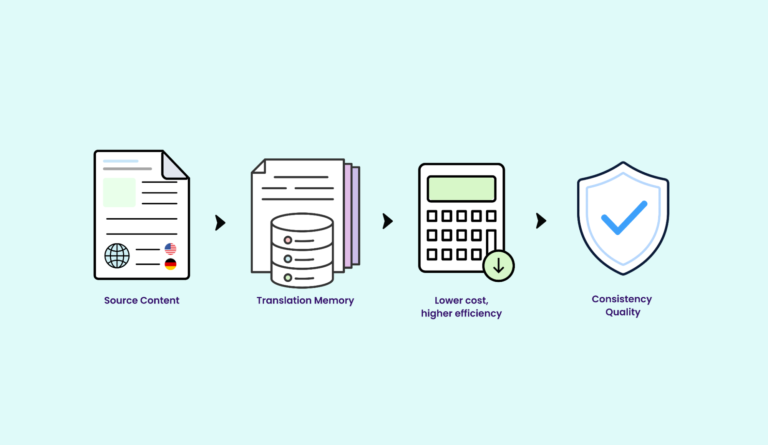
Translation memory and CAT tools are central to the translation industry, but they only deliver real value when projects are set up correctly at intake. Translation memory reduces costs by reusing previously approved segments, and Translation Memory improves consistency and lowers costs through reuse - but only if the right TM is connected to the right project from the start.
Awtomated connects email-originated projects to the correct translation memories and termbases based on client, domain (legal, life sciences, marketing), and previous projects. For example, when a client's July 2026 product update arrives, Awtomated surfaces the existing translation memory from the 2025 release and shows leverage bands directly in the quote - so the project manager can demonstrate reduced costs to the client and justify turnaround time.
Proper intake also ensures the correct workflow is chosen: full human translation for high-stakes global content, machine translation plus post editing for support articles, or TM-heavy update workflows for product releases with consistent terminology. Adaptive AI reduces per-word costs as models improve, and capturing MT preferences at intake lets teams benefit from those gains systematically. Exposing TM impact during intake supports transparent quoting and helps the translation project coordinator justify pricing to internal stakeholders and clients alike.
Assigning the Best Translators and Internal Reviewers at Intake
Vendor management decisions should be hard-wired into intake, not postponed until the last minute. Planning for resource allocation includes selecting linguists based on their expertise and availability - and that selection is far more accurate when project requirements are captured cleanly at the email stage.
Awtomated's vendor management connects project requirements - domain, language pair, subject matter expertise - with the best translators, not just the first-available resource. Important criteria to capture in the email-to-project flow include:
- Domain specialization (legal, medical, software UI, technical documentation)
- Expected volume and turnaround pressure
- Whether the client requires specific professional linguists or language skills
- Internal reviewers who must sign off per language, plus their role (legal review, marketing, country manager) and review windows
Identifying stakeholders and decision-makers clarifies responsibilities and communication channels. Clear escalation paths are essential for resolving terminology disputes and terminology decisions during the translation process. Regular input from linguists improves tools and processes in projects over time. This structured assignment at intake reduces scheduling conflicts and late approvals, supporting better project management overall and managing relationships between human linguists, internal teams, and clients at global scale.
Time, Budget, and Risk: Intake Details That Protect Margins
Small intake mistakes cascade into missed deadlines, scope creep, and lost margin on translation projects. Acceptance criteria must be defined before translation begins, and establishing quality expectations defines the level of linguistic review required for each project - whether that means a light human review or a full TEP cycle with legal sign-off.
Financial and time-related fields that belong in an Awtomated intake template:
- Client-specific price lists and currency
- Rush surcharges and minimum fees
- MT vs. human translation mix and preferences
- Cost per word targets by language and content type
- Project timeline with internal milestones and buffer times
Deadlines captured from the email ("end of business August 31, 2026 CET") should be turned into precise project timelines with internal milestones. The project manager can mark risk factors during intake: new subject matter, incomplete reference materials, unclear brand voice, or pending source finalization. Risk management at intake means flagging problems before they become expensive.
Awtomated uses these inputs to calculate profitability projections in real time, so teams don't accept unprofitable or unrealistic email requests by accident. When a project's margin looks thin, the translation project manager sees it before sending the quote - not after final delivery.
Turning Intake into Automated Workflows in Awtomated
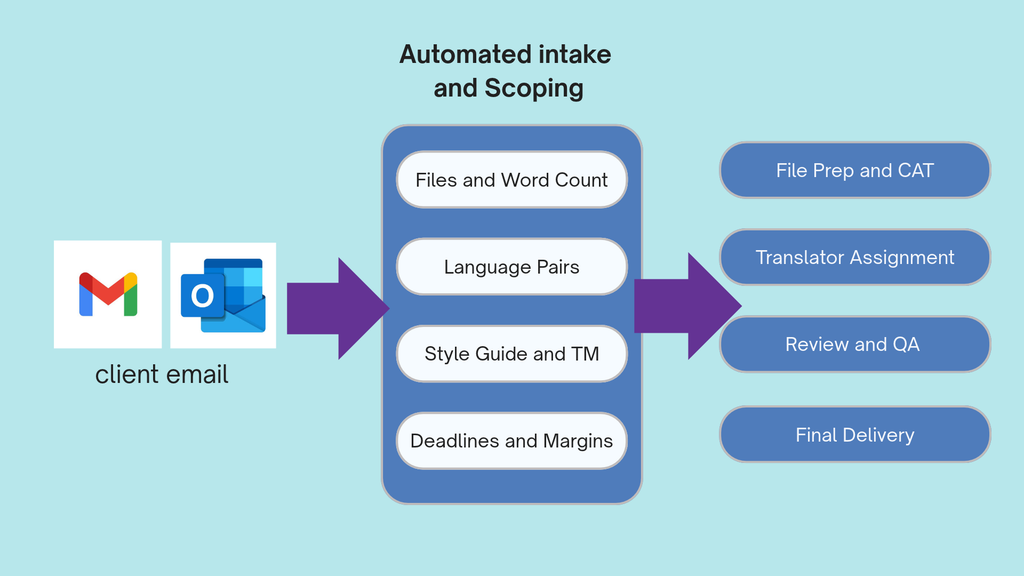
Once the email request is converted into a structured project, Awtomated can apply automated workflows instead of ad-hoc steps. Automated workflows can streamline project management in translation processes, and translation project management oversees projects across various content types - from marketing copy to technical documentation to legal contracts.
Typical workflow steps the system auto-creates:
- File preparation and word count analysis
- Translation assignment to approved translators
- Editing and proofreading by professional linguists
- In-country review by internal reviewers
- Desktop publishing for layout-sensitive file formats
- Final QA before delivery
Different workflows are selected based on risk or content type at intake. Simple translation plus review for low-risk internal comms. Full TEP for legal contracts where brand standards and accuracy are non-negotiable. MT plus human review for support articles where turnaround matters more. Quality assurance involves multiple rounds of checking for accuracy, and the workflow design chosen at intake determines how many rounds each project gets.
AI-native platforms automate project intake and reporting, and project management tasks like assigning linguists, sending purchase orders, and notifying internal reviewers can all be triggered automatically from confirmed intake data.
Rolling Out "Email to Project" Across Your LSP Team
Moving a team from manual copy-paste to using Awtomated's Gmail and Outlook integrations takes deliberate change management. Centralized communication channels improve workflow among remote teams, but the shift only sticks if it is introduced gradually and measured carefully.
Start with a pilot: one or two project managers, a few key clients, and a defined period (for example, Q4 2026) to refine the intake template and workflows. Training topics should cover how to recognize which emails should create projects versus quotes, how to classify attachments, and how to tag projects correctly inside Awtomated.
Set simple KPIs for the rollout:
- Time to first quote
- Number of email-originated projects with complete reference materials
- Reduction in manual data entry per project
Regularly reviewing the intake process improves efficiency and reliability of future translations. Once the pilot works, standardize the process with internal SOPs, short training videos, and Awtomated user permissions tailored for sales, PMs, and vendor managers. The localization process that once lived in everyone's inbox becomes a repeatable, measurable system.
Measuring the Impact of Better Translation Project Intake
A structured email-to-project flow should be measured with specific metrics to prove its value. Awtomated's KPI dashboards can track the following:
- Turnaround Time measures project completion speed by language
- On-time Delivery Rate tracks reliability across all language pairs
- Cost per Word tracks efficiency as AI models mature
- Quality Scores evaluate accuracy and tone from LQA evaluations
- Revision Rate flags process issues or model drift requiring intervention
- TM Contribution shows how much prior content reduced effort
Compare "before and after" periods for manual versus automated intake. According to Smartling's 2024 State of Translation Report, companies automating roughly 50% of content ingestion saved an average of $42,000 and over 1,000 hours annually. For a growing LSP, those numbers represent the difference between hiring another project manager and investing in global expansion.
Awtomated dashboards show trends per client - for example, improved on-time delivery after standardizing intake - and per domain, such as marketing versus legal versus technical. Better intake is the foundation that lets LSPs scale to multi-vendor, multi-currency operations at global scale without proportional admin growth. The real value is not just saving minutes per project; it is building a complete, accurate record that makes every future translation project faster and more profitable.
FAQ
These questions cover practical concerns about implementing email-to-project intake with Awtomated.
How long does it take to set up Gmail and Outlook intake with Awtomated?
Most agencies can connect their Gmail or Outlook accounts and start converting emails into projects within a few hours, including installing add-ins and mapping basic intake fields. Configuring advanced templates, custom fields, and workflows usually takes a few working days of iterative tuning with the Awtomated team, depending on how many content types and language pairs your agency handles.
Is it secure to turn client emails into projects inside Awtomated?
Awtomated is a cloud-based translation management system built for LSPs, with encrypted connections, role-based access, and audit trails for project and financial data. Email content and attachments containing sensitive data are stored according to the platform's security policies, and agencies can control which users see which clients, projects, and files - critical for agencies handling work in regulated industries.
Can we still use our existing CAT tools and translation memories?
Awtomated focuses on project, client, vendor, and finance management and is designed to work alongside common CAT tools via file-based workflows and integrations. Projects created from email can be prepared in Awtomated and then routed to your preferred CAT environment while still tracking translation memory usage, approved translations, and costs at the TBMS level.
What if a client sends requests via a portal or chat instead of email?
Awtomated supports multiple intake channels: direct client portal requests, manual project creation, and email-based intake, all coexisting in one account. Agencies can standardize fields and workflows across channels so that a project created from email or a portal form follows the same quality and financial rules - ensuring every translation project is complete and accurate regardless of how the request arrived.
Is email-to-project automation only useful for large LSPs?
Small agencies with just one or two project managers benefit quickly, because saving 10–15 minutes per project adds up over dozens of monthly requests. As agencies grow into new markets and add language professionals, the same intake automation lets them scale to multi-vendor, multi-currency project management without adding proportional admin headcount - the same process that works for five projects a week works for fifty.

Building software that helps small and medium-sized language service providers run their business.
About Rishi →Table of Contents
- Why Email-Based Translation Project Intake Is Broken Today
- From Inbox to Intake: How Awtomated Connects Gmail and Outlook
- Designing a Standard Translation Project Intake Form
- Capturing Scope and Requirements Directly from the Email
- Intake for Quality: Brand Voice, Style Guides, and Reference Materials
- Leveraging Translation Memory and CAT Tools from the First Email
- Assigning the Best Translators and Internal Reviewers at Intake
- Time, Budget, and Risk: Intake Details That Protect Margins
- Turning Intake into Automated Workflows in Awtomated
- Rolling Out "Email to Project" Across Your LSP Team
- Measuring the Impact of Better Translation Project Intake
- FAQ